Wednesday, 3 April 2024

Apple Vision Pro Spatial Personas Hands-On: A Step-Change For Telepresence

https://ift.tt/be4zOUS

Apple's Spatial Personas immediately change what it means to connect with someone else through virtual reality.

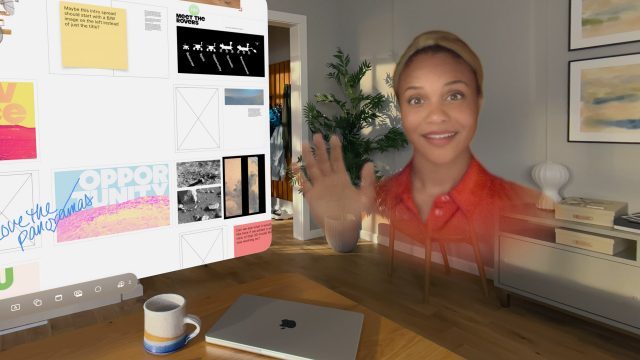
James O'Loughlin and I high fived within seconds of sharing a space together for the first time. We opened Apple's Freeform whiteboarding app and started putting together a list of movies we want to watch in VR. Though we'd connected previously over FaceTime, this was the first time I actually felt like we were sharing the same space in VR.

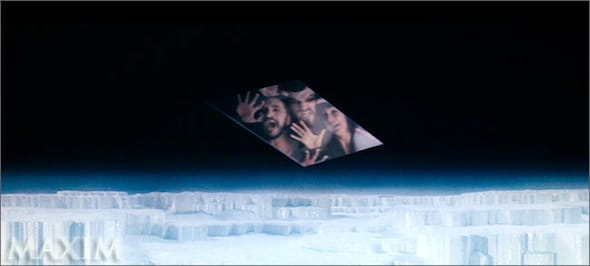
FaceTime calls still start as flat avatars in a window, but if you press the Spatial Personas button they'll emerge from the window like General Zod and his friends popping out of the Phantom Zone.
What Apple Vision Pro's FaceTime was like before Spatial Personas.

We started testing Apple's SharePlay service across different windows, testing each for whether its content is blocked by a digital rights management layer. YouTube content, for example, could be viewed together in sync either through the Juno app or as a website in Safari. This only works for videos that have been posted publicly without that DRM layer, so you won't be watching protected content made in Hollywood with another person unless you both have an active subscription to the same SharePlay-enabled app, like Disney+.

0:00
/0:03

Apple's own subscription services like Apple Arcade and Apple TV+ are the most obvious candidates for using Spatial Personas together. Game Room from Resolution Games, for example, is on Apple Arcade and offers classic titles like chess for people to enjoy gathered around a table together. David Heaney and developer Mike Manzano connected on a call with me and we set up a game of chess in my office. Even though Meta had board games on its headsets years ago, being able to look across the table and see the expressions on your opponent's face as you move your piece is something I haven't truly been able to experience in VR until this. The avatars might not match human realism in appearance – you always know you're looking at a digital human – but they are good enough. My first impressions were wrong and I didn't become uncomfortable after a few minutes, bringing me the closest I've felt to VR successfully collapsing space between people.

0:00
/0:27

While Apple's content subscription services are geared toward general consumers, the $3,500 Vision Pro is firmly in the category of professional computing device. We've encountered multiple Vision Pro buyers who purchased the headset but opted not to continue free trials for Apple's subscriptions. This means not only will Vision Pro owners have trouble finding someone else with the headset to SharePlay with as Spatial Personas, but even if they have the headset there's a chance you won't be able to access some of the best content without one of these subscriptions.

The flip side, of course, is that Spatial Personas just gave those people a major reason to pony up a little more and subscribe to those services in order to unlock a large large number of SharePlay-enabled movies, TV shows, and games they can experience in the same room with telepresent participants.
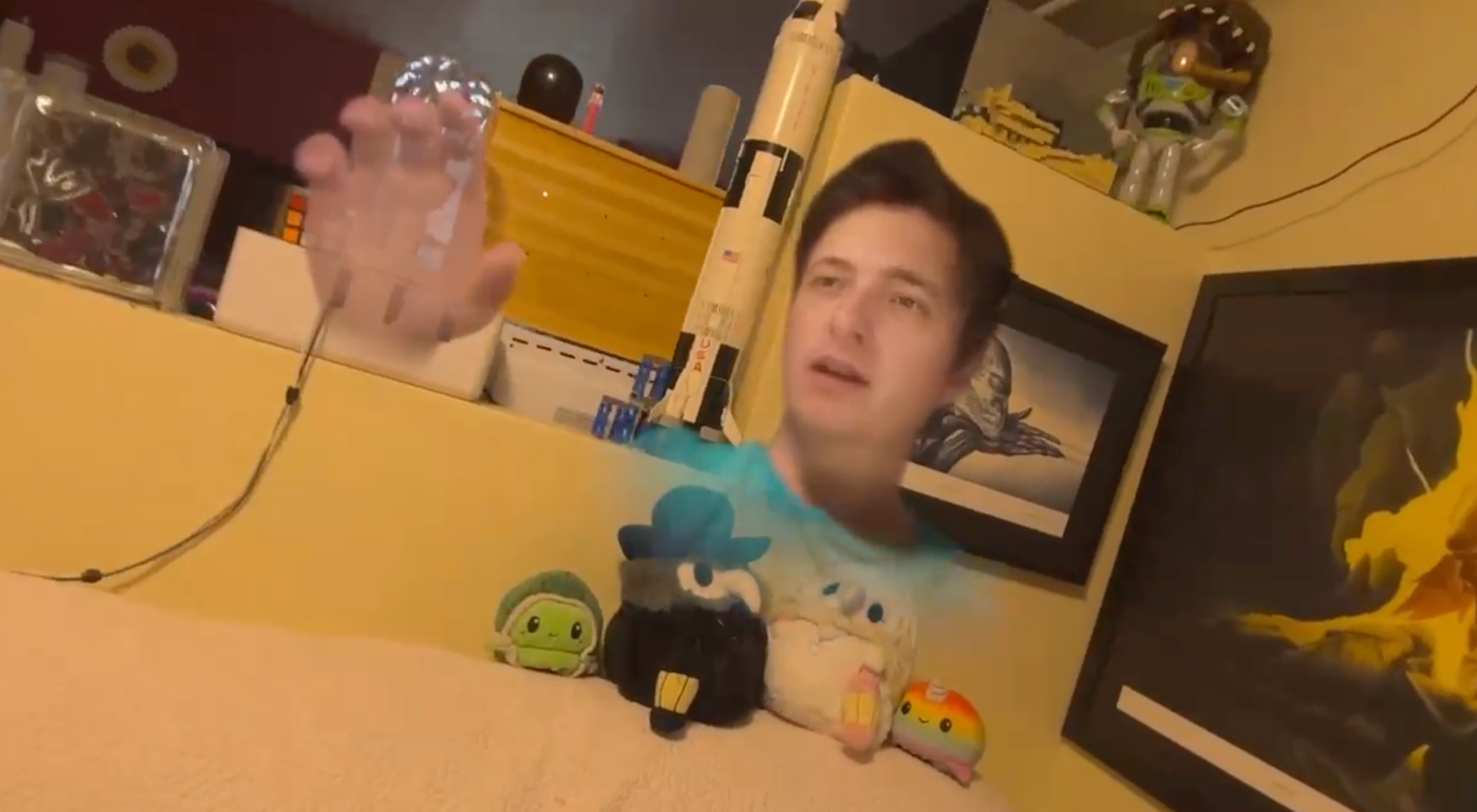
Around 1 pm Eastern I started receiving calls from my Vision Pro-owning contacts on the west coast of the United States. I was in a different headset broadcasting the VR Download at the time, but after I finished I connected with Azad Balabanian. He, like the others I connected with, immediately marveled at the freedom to really move around one another as soon as he emerged from the phantom zone. He opened up a 3D model of a scene he had captured, and we hovered together in front of a large door. We could both move or resize the model, and we could point out tiny details with our hands and immediately follow the finger to its intended target. The lighting in our physical rooms seemed to cast different shadows across the model for each of us, with him seeing the model cast in bright morning light streaming through his physical window, and myself seeing it lit by my overhead bulb.

We also watched a few minutes of Edge of Tomorrow in 3D from Apple TV+. I've watched my share of movies in Bigscreen and those experiences do not match how closely this resembled sitting on the couch and watching something together. I could tell he was reclined on his own couch, for instance, based on the way he was sitting, and we could glance at one another for a bit of conversation during the movie and make what felt like real eye contact as we did so. We each controlled the volume and captions for ourselves.

Meta has been working on its own hyper-realistic avatars system for years now that could one day provide a similar sense of powerful social presence with another physically distant person. In fact, after demos at Meta in 2022, I suggested the idea might be VR's killer app.

Apple Vision Pro launched in February without its killer app. You still can't connect with many people this way just yet and, at $3,500, very few people can afford to right now. Still, I had four VR developers in my home yesterday for engaging conversations and activities together and I've never been able to do that before in a VR headset.

Telepresence

Cisco 'telepresence"

"Telepresence" is an idea many people are familiar with, but its meaning would seem to have been watered down by decades of substandard video calling. Take, for instance, Cisco's "telepresence" systems, depicted above, and Google's Starline effort. Each would attempt to solve the same problem – letting people see eye-to-eye from two physically distant rooms through means other than putting on a VR headset. There's a reason this technology only exists inside board rooms at very large companies. It is stupid expensive, and very boring, to have two rooms set aside just so you can look directly into the whites of the eyes of your colleagues and plan future layoffs. How would Google or Cisco ever hope to put those systems in front of everyone on the planet? They wouldn't, with prices so high they're not even posted online publicly.

Meta might not be able to get its Codec Avatar technology running on a $500 or even a $1000 or $1500 headset just yet. Apple, however, was able to get Personas into a $3,500 system two months after release. And while much of UploadVR's audience doesn't have the ability to check this out right now, there's going to be some executives and venture capitalists reading this and re-considering whether Spatial Personas was what was missing during the push to work from home during the pandemic.


from UploadVR https://ift.tt/kRbMlS2
via IFTTT

Meta Now Requires Mandatory Age Confirmation on Quest Headsets

https://ift.tt/xqoQeMI

Meta announced it’s adding an obligatory age confirmation feature on the Quest platform, which in addition to asking you for your real birthday, could also put up a hard barrier on younger users accessing apps that aren’t age appropriate.

Within the next few days users will be prompted in-headset to confirm their age by re-entering their birthdate, which essentially divides users according to three specific age groups: adults, teens and preteens.

Here’s what those tiers mean:

  • Adults (18+): Choose between private or public profiles, control visibility of activity, and manage follower interactions.
  • Teens (13-17): Default to private profiles, with teens having control over follower requests and activity visibility. Parental supervision tools are available.
  • Preteens (10-12): Require parental approval for account setup, with strict privacy settings and parental control over app access.

Users who don’t want to insert their real birthdates don’t seem to have much choice in the matter, it seems. Meta is allowing users a 30-day window to re-enter birthdates, otherwise Quest accounts may be temporarily blocked until you do.

Furthermore, the company says in the announcement blogpost that users will be able to resubmit previously incorrect birthdates by verifying with the company, which is done either by submitting an ID or a credit card.

While Meta accepts a number of ID forms, such as government-issued IDs and multiple non-government-issued cards like library cards and student cards, the company says in its ID acceptance guidelines they do allow you to cover any non-essential information on your ID beyond your photo and date of birth.

“On our app store, we want to make it easier for developers to better understand the ages of people who use their apps so they can provide age-appropriate experiences for preteens, teens, and adults. Parents, in turn, can trust that apps are providing the most age-appropriate experience and protections the app offers for their child’s age,” Meta says in the announcement.

Meta announced last year it was reducing age requirements for Quest users, bringing the previous 13+ minimum down to 10+. The policy change brought with it parent-managed accounts to the Quest platform for the first time, which allows parents to manage things like screen time limits, privacy and safety settings, and access to specific types of content, which will specify whether apps have a social component.

The post Meta Now Requires Mandatory Age Confirmation on Quest Headsets appeared first on Road to VR.


from Road to VR https://ift.tt/wBlt1ai
via IFTTT

This Clever Immersion Hack Makes VR Feel More Real – Inside XR Design

https://ift.tt/Pn6kwaH

In Inside XR Design we examine specific examples of great VR design. Today we’re looking at the clever design of Red Matter 2’s ‘grabber tools’ and the many ways that they contribute to immersion.

Editor’s Note: Now that we’ve rebooted our Inside XR Design series, we’re re-publishing them for those that missed our older entries.

You can find the complete video below, or continue reading for an adapted text version.

Intro

Today we’re going to talk about Red Matter 2 (2022), an adventure puzzle game set in a retro-future sci-fi world. The game is full of great VR design, but those paying close attention will know that some of its innovations were actually pioneered all the way back in 2018 with the release of the original Red Matter. But hey, that’s why we’re making this video series—there’s incredible VR design out there that everyone can learn from.

We’re going to look at Red Matter 2’s ingenious grabber tools, and the surprising number of ways they contribute to immersion.

What You See is What You Get

At first glance, the grabber tools in Red Matter 2 might just look like sci-fi set-dressing, but they are so much more than that.

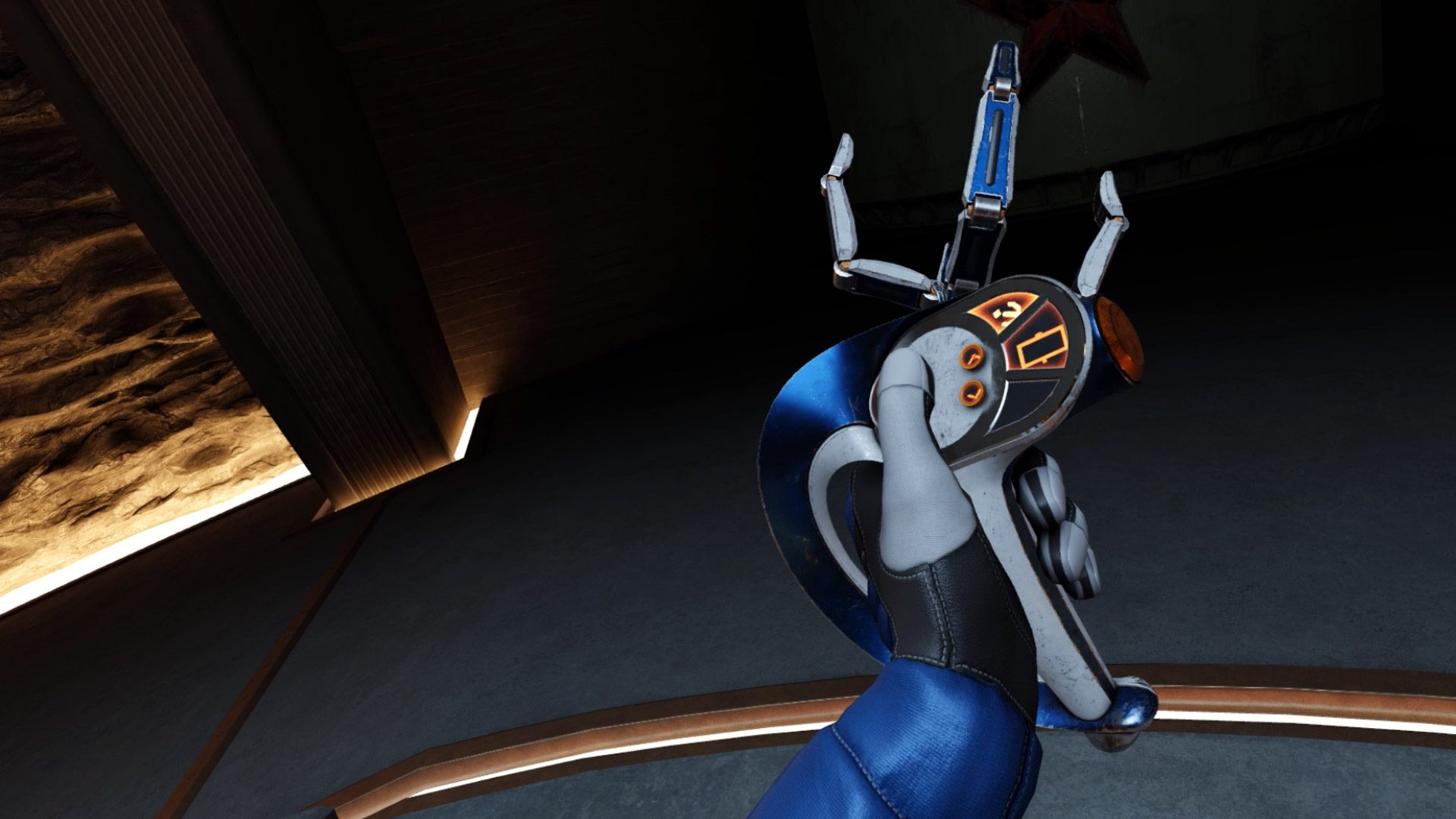
At a basic level, the grabber tools take on the shape of the user’s controller. If you’re playing on Quest, Index, or PSVR 2, you’ll see a custom grabber tool that matches the shape of your specific controller.

First and foremost, this means that players’ in-game hand pose matches their actual hand pose and the feeling of holding something in their hands. The shape you see in-game even matches the center of gravity as you feel it in your real hand.

Compare that to most VR games which show an open hand pose and nothing in your hand by default… that creates a disconnect between what you see in VR and what you actually feel in your hand.

And of course because you’re holding a tool that looks just like your controller, you can look down to see all the buttons and what they do.

I don’t know about you, but I’ve been using VR for years now, and I still couldn’t reliably tell you off the top of my head which button is the Y button on a VR controller. Is it on the left or right controller? Top or bottom button? Take your own guess in the comments and then let us know if you got it right!

Being able to look down and reference the buttons—and which ones your finger is touching at any given moment—means players can always get an instant reminder of the controls without breaking immersion by opening a game menu or peeking out of their headset to see which button is where.

This is what’s called a diegetic interface—that’s an interface that’s contextualized within the game world, instead of some kind of floating text box that isn’t actually supposed to exist as part of the game’s narrative.

In fact, you’ll notice that there’s absolutely no on-screen interface in the footage you see from Red Matter 2. And that’s not because I had access to some special debug mode for filming. It’s by design.

When I spoke with Red Matter 2 Game Director Norman Schaar, he told me, “I personally detest UI—quite passionately, in fact! In my mind, the best UI is no UI at all.”

Schaar also told me that a goal of Red Matter 2’s design is to keep the player immersed at all times.

So it’s not surprising that we also see that the grabber tools used as a literal interface within the game, allowing you to physically connect to terminals to gather information. To the player this feels like a believable way that someone would interact with the game’s world—under the surface we’re actually just looking at a clever and immersive way of replacing the ‘press X to interact’ mechanics that are common in flat games.

The game’s grabber tools do even more for immersion than just replicating the feel of a controller in your hand or acting as a diegetic interface in the game. Crucially, they also replicate the limited interaction fidelity that players actually have in VR.

Coarse Hand Input

So let me break this down. In most VR games when you look at your hands you see… a human hand. That hand of course is supposed to represent your hand. But, there’s a big disconnect between what your real hands are capable of and what the virtual hands can do. Your real hands each have five fingers and can dexterously manipulate objects in ways that even today’s most advanced robots have trouble replicating.

So while your real hand has five fingers to grab and manipulate objects, your virtual hand essentially only has one point of input—a single point with which to grab objects.

If you think about it, the grabber tool in Red Matter 2 exactly represents this single point of input to the player. Diegetically, it’s obvious upon looking at the tool that you can’t manipulate the fingers, so your only option is to ‘grab’ at a one point.

That’s a long way of saying that the grabber tools in Red Matter 2 reflect the coarse hand input that’s actually available to us in VR, instead of showing us a virtual hand with lots of fingers that we can’t actually use.

So, In Red Matter 2, the grabber tools contextualize the inability to use our fingers. The result is that instead of feeling silly that we have to rotate and manipulate objects in somewhat strange ways, you actually feel like you’re learning how to deftly operate these futuristic tools.

Immersion Insulation Gap

And believe it or not, there’s still more to talk about why Red Matter 2’s grabber tools are so freaking smart.

Physics interactions are a huge part of the game, and the grabber tools again work to maintain immersion when handling objects. Like many VR games, Red Matter 2 uses an inertia-like system to imply the weight of an object in your hand. Small objects move quickly and easily, while large objects are sluggish and their inertia fights against your movement.

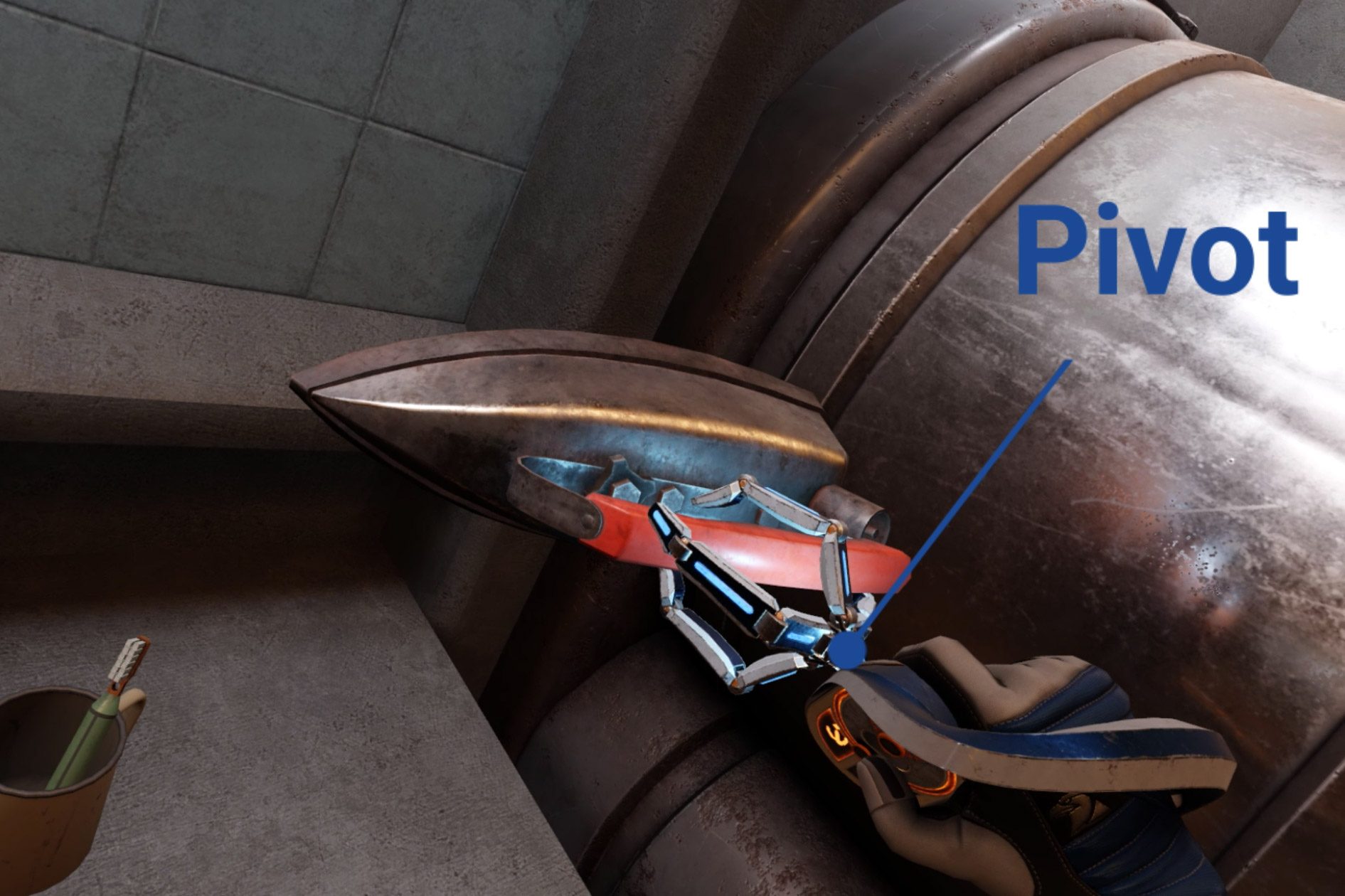
Rather than imagining the force our hands would feel when moving these virtual objects, the grabber tools create a sort of immersion insulation gap by providing a mechanical pivot point between the tool and the object.

This visually ‘explains’ why we can’t feel the forces of the object against our fingers, especially when the object is very heavy. The disconnect between the object and our hand—with the grabber tool as the insulator in the middle—alleviates some of the expectation of the forces that we’d normally feel in real life, thereby preserving immersion just a little bit more.

Unassuming Inventory

And if it wasn’t clear already, the grabber tools are actually… your inventory. Not only do they store all of your tools—like the flashlight, hacking tool, and your gun—you can even use them to temporarily stow objects. Handling inventory this way means that players can never accidentally drop or lose their tools, which is an issue we see in lots of other VR games, even those which use ‘holsters’ to hold things.

Inhuman Hands

And last but not least…the grabber tools can actually do some interesting things that our hands can’t. For example, the rotating grabber actually makes the motion of turning wheels like this one easier than doing it with two normal hands.

It’s no coincidence that the design of the grabber tools in Red Matter 2 is so smartly thought through… after all, the game is all about interacting with the virtual world around you… so it makes sense that the main way in which players interact with the world would be carefully considered.

To take full advantage of the grabbers, the developers built a wide variety of detailed objects for the game which are consistently interactive. You can pick up pretty much anything that looks like you should be able to.

And here’s a great little detail that I love to see: in cases where things aren’t interactive, all you have to do is not imply that they are! Here in Red Matter 2 the developers simply removed handles from this cabinet… a clear but non-intrusive way to tell players it can’t be opened.

Somewhat uniquely to VR, just seeing cool stuff up close like it’s right in front of you can be a rewarding experience all on its own. To that end, Red Matter 2 makes a conscious effort to sprinkle in handful of visually interesting objects, whether it’s this resin eyeball, papers with reactive physics, or this incredible scene where you watch your weapon form from hundreds of little balls right in your hand.

– – — – –

Red Matter 2’s grabber tool design is so beneficial to the game’s overall immersion that, frankly, I’m surprised we haven’t seen this sort of thing become more common in VR games.

If you want to check all of this out for yourself, you can find Red Matter 2 on Quest, PSVR 2, and PC VR. Enjoyed this breakdown? Check out the rest of our Inside XR Design series and our Insights & Artwork series.

And if you’re still reading, how about dropping a comment to let us know which game or app we should cover next?

The post This Clever Immersion Hack Makes VR Feel More Real – Inside XR Design appeared first on Road to VR.


from Road to VR https://ift.tt/oOSIC8W
via IFTTT

Tuesday, 2 April 2024

VR’s Best (or possibly worst) April Fool’s Day Jokes This Year

https://ift.tt/TfyDhCa

April Fool’s Day is more than just a time to pull harmless pranks. It’s also about putting on your ‘skeptic hat’ and really asking whether you can believe your eyes, as trusted companies and key figures in XR dropped a few doozies yesterday that are so great they’re terrible.

‘Virtual Boy Pro’ MR Headset

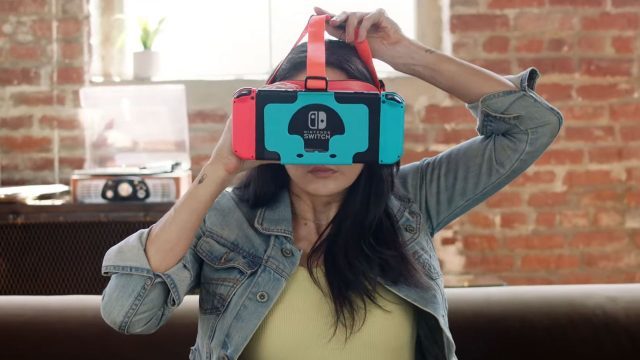
Nintendo actually teamed up with IGN to poke some serious fun at the biggest XR companies out there—but also apparently anyone who wanted the Japanese gaming giant to poke their heads back into the medium since it last released its Nintendo Labo VR kit in 2019, which brought not only a few fun VR mini-games to Switch, but also VR support for a number of Switch titles.

While the so-called ‘Virtual Boy Pro’ has seemingly better ergonomics than its 1995-era namesake, it still looks pretty dang front-heavy. Just the same, here’s the main copy from the fake reveal video, seen above:

Virtual Boy Pro turns the world around you into a new level from Nintendo’s most beloved video game properties. Super Mario: Home Run is an all new platforming adventure featuring everyone’s favorite plumber, but this time, he’ll be running, jumping and ground-pounding Goombas in your world. Virtual Boy Pro transforms any environment into an interactive level, allowing Mario and friends to interact seamlessly with your physical surroundings.

Nintendo and IGN promised Virtual Boy Pro players could also play augmented reality versions of The Legend of Zelda: Breath of the Wild and The Legend of Zelda: Tears of the Kingdom, as well as fictional games Link’s Korok Catcher, Animal Crossing: Moving Day, and Luigi’s Mansion 4. 

Not only that, but Virtual Boy Pro was said to transform supported vacuum cleaner models by Dyson, Oreck, Shark or Bissell into Luigi’s Poltergust 3000, “creating a seamless integration between virtual ghost hunting and real-world housekeeping.”

If it wasn’t obvious by now, Virtual Boy Pro also promised to actually let you drive while playing fictional game Mario Kart: Open Road, which would “transform your daily commute to work into a 200cc Grand Prix race down Rainbow Road.”

‘Walkabout Mini Golf’ Legs Update

Walkabout Mini Golf is one of the bigger VR success stories, as the game has found solid footing among fans, letting developers Mighty Coconut attract some high-profile partnerships over the years to really flush out its paid DLC courses to include everything from the original MYST map to a new Wallace & Gromit course coming soon.

But what is really missing from the hit indie putt-putt golf game? Why, legs of course!

The studio doesn’t lay it on too thick, as the linked blog post simply says “April Fools,” although you can’t help but wonder when the game that tasks you with walking about will include the game’s second most important limbs.

Virtual Desktop Developer Hired by Meta

Guy Godin, the developer of Virtual Desktop, has had a bit of a love-hate relationship with Meta over the years. While the highly-rated paid app has done very well on PC VR platforms as well as Quest, staying relevant as Meta ostensibly replicates a lot of your functionality has presented Godin with a constant battle to stay one step ahead of Quest’s baked-in functionality Air Link, which lets you stream PC VR games to Quest over Wi-Fi.

When we heard he was making the move to Meta Reality Labs, it was basically like hearing Canada was dissolving its border with the US—and of course being polite enough not to ask for a star on the flag while they were at it.

Godin doesn’t mince words either. In a follow-up post, he promised he would also “make sure to take at least 6 months before adding 120hz support. I’ll also randomly remove or break features people use. Can’t wait!”

Pillow’s New Toilet Mode

Pillow is a mixed reality app from serial inventor and XR designer Lucas Rizzotto. The app is meant to be used laying down so you can do a host of relaxing things like transform your ceiling into an interactive night sky and unwind to rhythm-based breath-tracked meditations.

Rizzotto announced a new ‘toilet mod’ was coming to Pillow, which admittedly is the second most comfortable place in your home.

https://twitter.com/_LucasRizzotto/status/1774905760008532195

Not only does the fake update let you use Pillow in the toilet, but Rizzotto also teased the studio was announcing a new shower mode too, which would actually be pretty cool if the darn lenses didn’t fog up so much.

Indie adventure RPG Dave the Diver (2023) isn’t a VR game, but developer MINTROCKET announced it was coming out with its own fake DLC which would include a VR love simulator based on Dave’s favorite anime idol, Leahs.

The fake Steam update says it even includes voiced lines in Korean, Japanese, English, Chinese, German, French, Vietnamese and Lithuanian.


What was your favorite April Fool’s joke this year in XR? Let us know in the comments below!

The post VR’s Best (or possibly worst) April Fool’s Day Jokes This Year appeared first on Road to VR.


from Road to VR https://ift.tt/YGHJETi
via IFTTT

Apple Vision Pro Now Has 3D 'Spatial Personas' For Virtual Hangouts & Meetings

https://ift.tt/9VHD18K

Apple Vision Pro's long-anticipated 'Spatial Personas' feature is now available.

Personas are Apple's realistic virtual avatars in visionOS, driven in real-time by the headset's eye, face, and hand tracking sensors. Since the headset's launch your Persona has appeared as a 2D virtual camera feed in any iPad or iPhone app that requests the selfie camera, as well as visionOS apps that integrate Personas such as FaceTime.

0:00
/0:24

Spatial Personas in Apple's Freeform collaboration app.

The new Spatial Personas on the other hand are 3D. They appear in your space, either passthrough or a virtual environment, with shared spatial context. That means unlike with traditional video calls and regular Personas, you'll each see virtual windows and volumes at the same position and angle as if you were physically together, just as in real life and multiplayer VR apps.

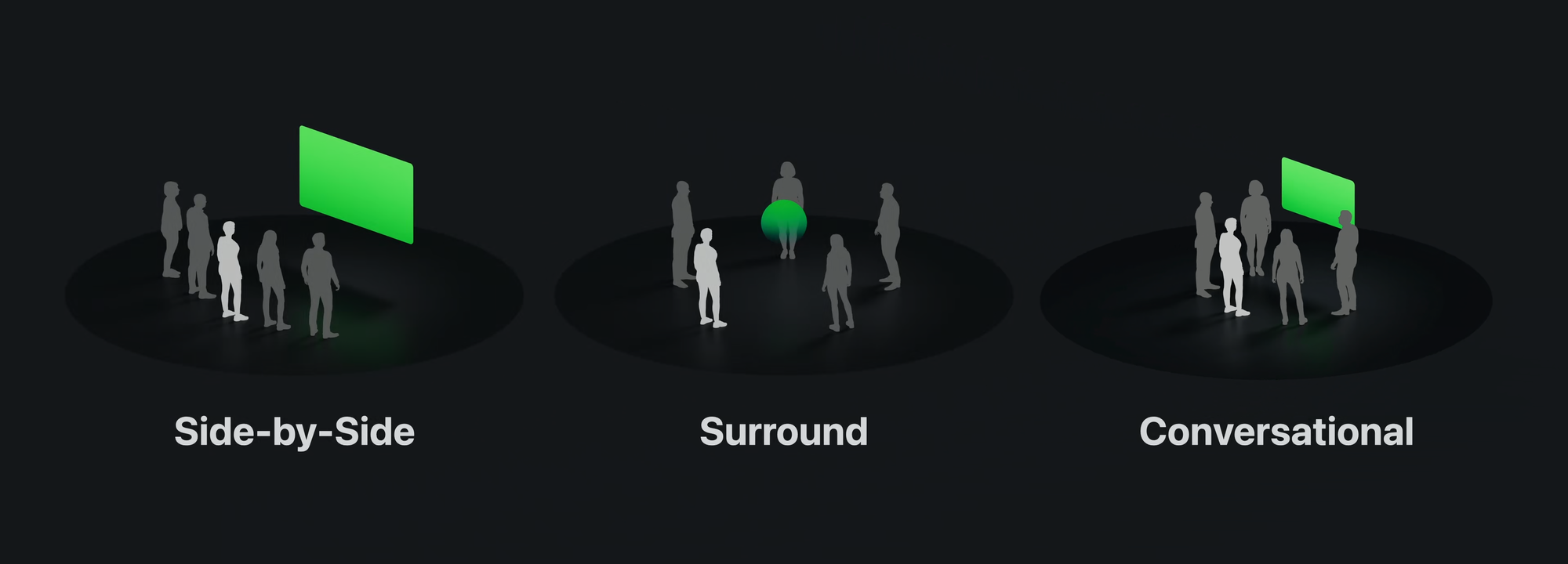
Apple is offering three Spatial Persona positioning templates for developers: Side-By-Side, Surround, and Conversational.

You can watch movies and TV shows in Side-By-Side with others in SharePlay-enabled apps such as Apple TV+ and Disney+ if all participants in the call are subscribed to, or own, the content you want to watch.

You can also use FaceTime's screen-sharing feature to let other people see any non-DRM app you're using. And in visionOS apps that support SharePlay, such as the Freeform virtual whiteboard app, you can even interact with the app together at the same time. Apple has architected visionOS to make it relatively easy for developers to synchronize app states between users, so we expect many other apps to support this soon.

Apple says Resolution Games' Game Room already supports Spatial Personas, presumably in Surround mode, to let you play Chess, Solitaire, Hearts, Yacht, Sea Battle, and Flip It while virtually sitting across from each other.

Spatial Personas is included in visionOS 1.1 and activated today, though the feature wasn't included in the changelog. It currently isn't the default FaceTime experience though. To enable Spatial Personas on a call, you'll need to tap a person's 2D Persona tile and select 'Spatial'.


from UploadVR https://ift.tt/gOwjd41
via IFTTT

Hands-on: Apple Upgrades Personas for True Face-to-face Chats on Vision Pro

https://ift.tt/p6LMfKg

Apple today released ‘Spatial Personas’ in public beta on Vision Pro. The newly upgraded avatar system can now bring people right into your room. We got an early look.

Much has been said about Apple’s Persona avatar system for Vision Pro. Whether you find them uncanney or passable, one thing is certain: it’s the most photorealistic real-time avatar system built into any headset available today. And now Personas is getting upgraded with ‘Spatial Personas’.

But weren’t Personas already ‘spatial’? Let me explain.

Sorta Spatial

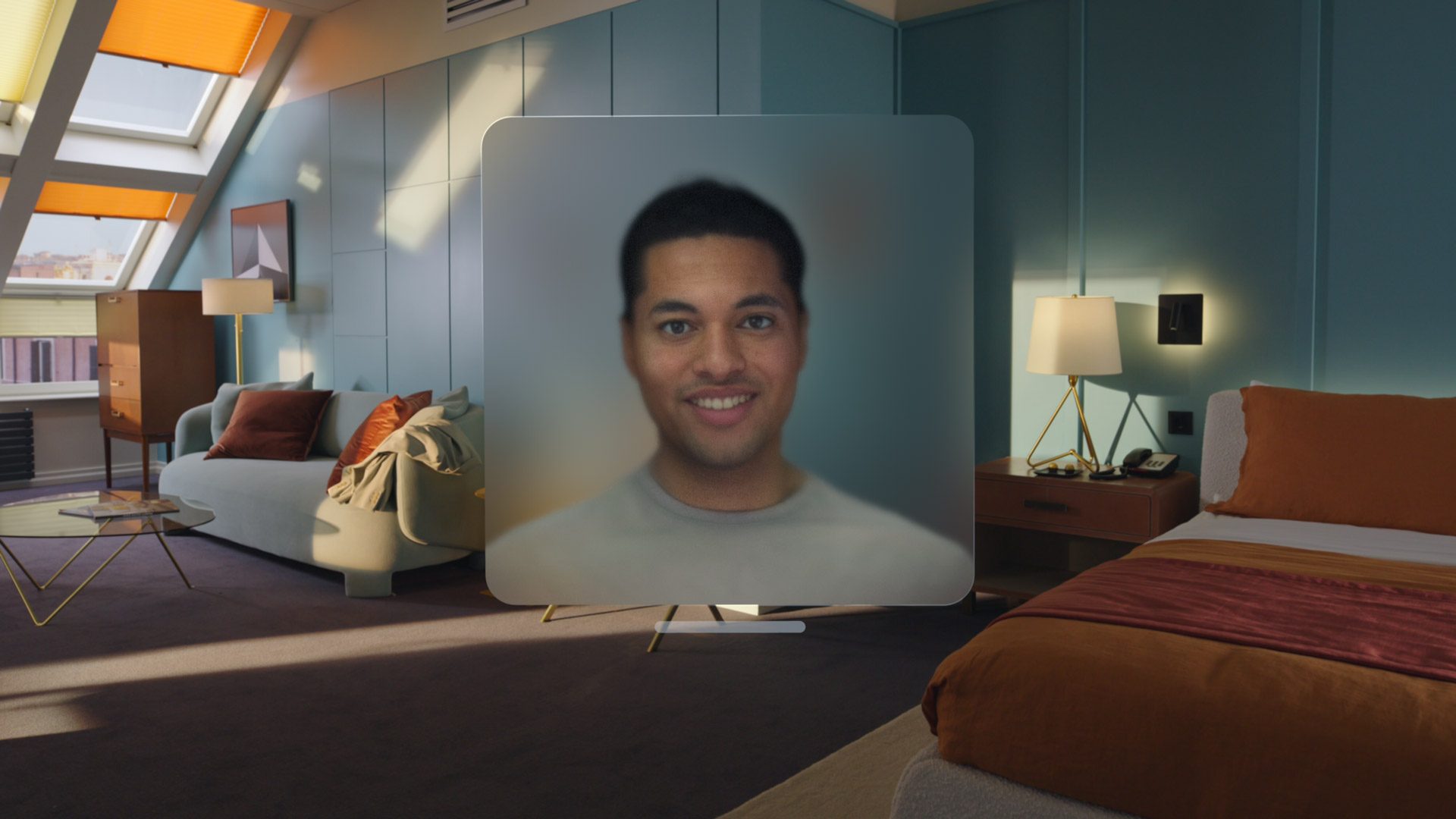
At launch the Persona system allowed users to scan their faces into the headset to create a digital identity that looks and moves like the user thanks to the bevy of sensors in Vision Pro. When doing a FaceTime call with another Vision Pro user (or users), their Persona(s) head, shoulders, and hands would be shown inside a floating box.

Image courtesy Apple

While this could feel like face-to-face talking at times, the fact that they were contained within a frame (which you can move or resize like any other window) made it feel like they weren’t actually standing right next to you. And that’s not just because of the frame, but also because you weren’t actually in a sharing the same space as them—it’s not like they could walk right up to you for a high-five, because they’d be stuck in the window on your screen.

Face-to-face

Now with Spatial Personas (released in beta today on the latest version of VisionOS), each person’s avatar is rendered in a shared space without the frame. When I say ‘shared space’, I mean that if someone takes takes a step toward me in their room, I actually see them come one step closer to me.

Previously the frame made it feel sort of like you were doing a 3D video chat. Now with the shared space and no frame, it really feels like you’re standing right next to each other. It’s the ‘hang out on the same couch’ or ‘gather around the same table’ experience that wasn’t actually possible on Vision Pro at launch.


And it’s really quite compelling. I got a sneak peek at the new system in a Vision Pro FaceTime call with four people (though up to five are supported total), all using Spatial Personas. You’ll still only see their head, shoulders, and hands but now it really feels like a huddle instead of a 3D video chat. It feels much more personal.

Spatial Personas Are Opt-in

To be clear, the ‘video chat’ version of Personas (with the frame) still exists. In fact, it’s the default way that avatars are shown when a FaceTime call is started. Switching to a Spatial Persona requires hitting a button on the FaceTime menu.

And while this might seem like a strange choice, I actually think there’s something to it.

On the one hand, the default ‘FaceTime in Vision Pro’ experience feels like a video chat. In everyday business we’re all pretty used to seeing someone else on the other side of a webcam by now. And even though this is more personal than an audio-only call, it’s still a step away from actually meeting with someone in person.

Spatial Personas is more like you’re actually meeting up in person, since you can actually feel the interpersonal space between you and the other people in this shared space. If they walk up and get a little too close, you’ll truly feel it in the same way if someone stands too close to you in real life.

So it’s nice to have both of these options. I can ‘video chat’ with someone with the regular mode, or I can essentially invite them into my space if the situation calls for a more personal meeting.

And Spatial Personas aren’t just for chatting. Just like regular Personas, you can use SharePlay while on FaceTime to watch movies and play games together (provided you both have a supported app installed).

Take Freeform for instance, Apple’s collaborative digital whiteboard app. If you launch Freeform while on a FaceTime call with Spatial Personas, everyone else will be asked to join the app, which will then load everyone in front of the whiteboard.

Everything is synchronized too. Anyone else in the call can see what you’ve put on the whiteboard and watch in real time as you add new photos or draw annotations. And just as easily, anyone can physically walk up to the board and interact with it themselves.

When it comes to shared movie viewing on Apple TV on Vision Pro, Spatial Personas unlock the feeling of sitting on the same couch together, which wasn’t quite possible with the headset at launch. Now when you watch a movie with your friends you’ll be sitting shoulder to shoulder with them, which feels very different than having a window with their face in it floating near the video you’re watching.

It’s possible to stream many flat apps to anyone in the FaceTime call while using Spatial Personas, but for 3D or interactive content developers will need to specially implement the feature.

That’s somewhat problematic though because it’s difficult to know exactly which apps support Spatial Personas or even SharePlay for that matter. As of now, you have to scroll all the way to the bottom of an app’s page to see if it supports SharePlay (unless the developer mentions it in the app’s description). And even then this doesn’t necessarily mean it supports Spatial Personas.

The Little Details

Apple also thought through some smaller details for Spatial Personas, perhaps the most interesting of which is ‘locomotion’.

Room-scale locomotion is essentially the default. If you want to move closer to a person or app… you just physically walk over to it. But what happens if it’s outside the bounds of your physical space? Well, instead of directly moving yourself virtually, you can actually move the whole shared space closer or further from you.

You can do this any time, in any app, and everyone else will see your new position reflected within their space, keeping everything synchronized.

Apple also made is so when two Spatial Personas get too close together, they will temporarily revert to just looking like a floating contact photo. I think this is probably because they want to avoid possible harassment or trolling (ie: you want to annoy someone so you phase your virtual hand right through their virtual face, which is uncomfortable both visually and from an interpersonal space standpoint).

The headset’s excellent spatial audio is of course included by default, so everyone sounds like they’re coming from wherever they’re standing in the room, and their voices actually sound like they’re in your room (based on the headset’s estimate of what the acoustics should sound like). And if you move to a fully immersive space like an ‘environment’, the spatial audio transitions to that new acoustic environment—so for instance you can hear people faintly echoing in the Joshua Tree environment because of all the rock surfaces nearby. Hearing the acoustics fade from being inside your own room to being ‘outside’ in an environment is a subtle bit of magic.

Image courtesy Apple

And last but not least, it’s possible to have a mixed group of FaceTime participants. For instance you could have people using an iPhone, an Android tablet (yes you can FaceTime with people on non-Apple devices), a normal Persona, and a Spatial Persona all at once. SharePlay in that case will also work between those formats (except non-Apple devices) as long as long as the app supports it. In cases with apps that are Vision Pro native, the iPhone user would get a notification that their device isn’t supported.

– – — – –

Spatial Personas is a big upgrade to Apple’s avatar system, but the company maintains the whole Persona system is still in ‘beta’. Presumably that means there’s more improvements yet to come.

The post Hands-on: Apple Upgrades Personas for True Face-to-face Chats on Vision Pro appeared first on Road to VR.


from Road to VR https://ift.tt/hG6LZes
via IFTTT

Monday, 1 April 2024

How The Pirate Queen Brings Cheng Shih's History To Life In VR

https://ift.tt/wbLqr8E

Following last month's launch, we spoke with The Pirate Queen's director to learn more about this 19th-century adventure. Read on for our full interview:

Created by Singer Studios, The Pirate Queen: A Forgotten Legend is a narrative adventure game focused on puzzle-solving and exploration. It stars Lucy Liu as Cheng Shih, leader of the South China Sea's Red Flag Fleet. In our recent review, we found it to have a refreshing focus on exploration and story over combat.

During GDC 2024, we sat down with director Eloise Singer for a Q&A session. I'm told The Pirate Queen began as a film, which initially was put on hold due to the COVID-19 pandemic. Having previously discussed developing a game with Dr. Dave Ranyard, former studio director at PlayStation's (soon to be closed) London Studio, she received funding from the UK's Creative England. Later winning Best Debut at Raindance, Meta agreed to support The Pirate Queen.

Asking how Lucy Liu got involved, Singer explains she approached her team with this story after being accepted for the Tribeca Festival, talking about the historical accuracy side of this story with her. A key aim was to ensure players feel like they're stepping into 19th-century China, pointing to the game's ships as an example.

"We initially made the ships with wooden pack and metal nails. However, our researchers told us that China didn't use metal nails back then. Our artists had to remove all of the nails and replace them with dovetail joints to ensure we were representative of that time."

As for choosing VR specifically, Singer points to the medium's immersive potential.

"It's the only medium that can do this story in such an immersive way. There's no other way to step onto a 19th-century pirate ship. For us, being able to experience this through a female leader of the time that people have seemingly forgotten about is really exciting."

Singer Studios wasn't targeting "highball gamers" with The Pirate Queen, instead aiming for VR newcomers through more "comfortable" gameplay and less complex interactions. Singer tells me that's why the rowing section go on-rails instead of offering free movement, as a means of mitigating motion sickness.

"We're not trying to reinvent the wheel in mechanics. We wanted to create a game that isn't violent without combat, because we want something that kids can play that parents are really excited about... it's exciting to champion something that new players can come into and feel quite empowered by."

Regarding combat, Singer said the team "really thought about it" and considers its exclusion a "huge creative risk." However, this would have gone against the studio's values, so they settled on a sequence near the end involving indirect combat by lighting cannons to create something cinematic.

"We don't want to create things where you're killing people. I want to leave a legacy where I'm creating games that inspire people, so it didn't feel right."

It's been no secret since The Pirate Queen's announcement that the studio is looking to champion female empowerment. Singer touches upon that multiple times, telling me she's proud to create a game that champions narrative and female characters and points to her previous project, Mrs Benz. She believes getting new audiences in requires being able to create different narratives.

"If I compare it to film, it's like if we just had James Bond in the cinema every single day. Ultimately, 50% of gamers are women, and that's not reflected in VR yet. We need to create games in VR that reflect that in order to attract that audience."

As for what's next, Singer Studios previously confirmed multimedia plans for a graphic novel and film. While the VR game focuses on the night Cheng Shih rises to power, I'm told the graphic novel's first volume will be a more expansive story about her entire life, starting with her early days as a flower boat girl before eventually opening a gambling den. Future volumes will focus on other pirates, while the film will be animated.

The Pirate Queen: A Forgotten Legend is available now on the Meta Quest platform and SteamVR.


from UploadVR https://ift.tt/lkVRFh6
via IFTTT
Related Posts Plugin for WordPress, Blogger...