That may not sound like a lot. But comparing it to other currently niche items on the Hardware Survey shows PC VR is off to a great start.
In April 2019, Valve reported Steam reaching 90 million monthly active users. If we assume that figure has now grown to roughly 100 million, we can estimate the number of Steam users with a VR headset as roughly 1,160,000.
More Steam users have a VR headset than an RTX 2080 Ti or than use Linux. At current growth, it shouldn’t be long before more Steam users use a VR headset than have a 4K primary monitor.
Consumer VR is still a relatively new technology. The Oculus Rift and HTC Vive were released just four years ago, with the latter launching at $800 including controllers. Today you can get a similar experience for $400 or even lower. As hardware gets cheaper and better and more must-have VR games emerge, this percentage should steeply rise throughout this decade.
VR Headsets On Steam
Using the March Hardware Survey data and the estimate of 100 million Steam active users, we can arrive at what should be a decent estimate for how many of each headset are in use.
For newer headsets, this number should be somewhat close to how many were sold. Older headsets are more likely to be in storage or inoperable.
Just under half of the headsets on Steam are from Facebook’s Oculus Rift brand. The company’s newest PC headset Rift S is the most popular headset on Steam, used by more than a quarter of SteamVR users. The original Rift, once the most popular on Steam, is now used by 15% of SteamVR users.
HTC’s Vive brand is in second place, with almost a third of users. The vast majority of this comes from the original Vive launched back in 2016- the first consumer headset to offer room scale tracking & positionally tracked controllers. Today, roughly one quarter of VR headsets on Steam are still the original Vive.
HTC’s latest consumer headset, Vive Cosmos, is used by just 1.23% of SteamVR users. That’s less than than half the number for the Oculus Quest (2.9%), which isn’t even a native PC VR headset.
Valve’s premium Index HMD now represents over 1 in 10 headsets on SteamVR. This is an impressive feat given the $1000 pricetag for the full kit. It could be seen as proof against Facebook’s product positioning which suggests they believe consumers aren’t interested in hardware at that price.
Microsoft’s Windows MR platform took an opposite approach, with many low cost headsets from different manufacturers. However despite continuous aggressive price cuts as low as $150, consumers just don’t seem interested, so they make up less than 1 in 12 headsets.
Pimax headsets now show up on the survey- specifically the 5K Plus and 8K, thought to be the most popular of the company’s many offerings. As suspected, these are fairly niche products, with even both together making up less than 1 in 300 SteamVR users.
In fact, more Steam users are rigging their PlayStation VR using third-party drivers to work with PC VR- roughly 1 in 200 SteamVR users. This is achieved with drivers like Trinus or iVRy. But unless you’re just using it for cockpit games, you’ll also need a third party tracking service such as PSMoveService or Driver4VR. Keep in mind the quality of tracking often won’t be as good as on a PlayStation 4.
Inside-out tracking has enabled lower cost headsets and easier setup, accounting for the majority of VR headset growth since May 2019 thanks to the Rift S. However, 6 in 10 headsets on Steam are still tracked with external hardware thanks to the huge numbers of Oculus Rift and HTC Vives still in use.
The SteamVR “Lighthouse” tracking system enables interoperability between headsets and controllers. Owners of the original HTC Vive are able to purchase & use Valve Index controllers, for example. This could explain why the Vive is still used much more than the original Oculus Rift, for example.
We’ll Be Keeping Track
Because of the improvements to detection, the 1.16% can’t be compared to previous Steam Hardware Survey data. But UploadVR will continue to track the data over this year. We’ll keep you updated on the growth of PC VR over time.
Over the next few months, Valve’s “flagship” AAA title Half-Life: Alyx, and its incredibly positive reception across the games industry, may be a primary driver of this growth- assuming Facebook & Valve can ramp up to produce enough headsets to meet demand. We won’t, however, see the effect of Alyx on PC VR usage until the next report in May, according to Valve.
Players will need an Xbox controller and their own ROM files.
Those familiar with the world of video game emulation are no doubt familiar with the open-source console emulator Dolphin. Originally released in 2003 on Windows, this brilliant piece of software allows players to run Nintendo Gamecube and Wii console games on their Windows, macOS, and Android devices.
Last year a user going by the name Pixelacos on YouTube posted a video of Dolphin running natively on the Oculus Quest headset. The VR emulator, while rough, does a commendable job at running Gamecube and Wii games in 2D on the Quest, especially considering the standalone headsets’ limited processing power. Some games work better than others according to Pixelacos, though to see any Nintendo game running natively on Oculus hardware is a feat in its own right.
Here’s how to get started playing Gamecube and Nintendo Wii games on your Quest headset today:
Download and install SideQuest to your Windows PC or Mac. Be sure you have your Oculus Quest headset set to Developer Mode.
Gather your ROM files and copy them to your Quest.
According to Pixelacos, you will need a Bluetooth controller and a computer capable of running SideQuest in order to play. You will also need to provide your own ROM files for the games you wish to play.
Technology can augment the world around us, it can enhance the human experience, our capabilities, and also extend our reality to digital and virtual worlds. As people flock online during quarantine, we are experimenting with new platforms, pushing immersive technologies to the limits, and collaborating in new ways. From eye-tracking technology, facial tracking, biometrics, and mind control, just how far are we from becoming one with the metaverse and what can we learn about ourselves through sensory technologies?
Brain-Computer Interfaces
Brain-computer interface systems like Neurable’s VR game Awakening uses an electrode-laden headband, connected to an HTC Vive HMD, to track brain activity. The software analyzes the data to figure out what should be happening in a game. In 2017, the MIT Technology Review wrote that only one year later this technology could be mainstream and picked up by VR arcade companies. It was an optimistic estimate as consumers and hardware alike have required a transition and adoption phase. Now in 2020, could we really be a year away from consumer-ready mind control systems?
CTRL-Labs takes another approach to HCI (human-computer interfaces) and uses a simple electrode-studded wristband to read neural signals from the arm. In June 2019, CTRL-Labs acquired patents from Myo, a similar wearable created by North that enables control of robotics and PCs via gestures and motion. Shortly after, in September 2019, CTRL-Labs was acquired by Facebook, becoming a part of the Facebook Reality Labs team to build the technology as a consumer product. As Oculus launched hand-tracking on the Quest in December 2019, I wonder if consumer-ready mind-controlled systems could be even less than one year away.
Perhaps more widely known in mind-control systems is Elon Musk’s Neuralink. It’s by far the most invasive technique, that involves inserting 96 threads into the brain with micron precision. It’s a risky business, but also an absolute reality. “An integrated brain-machine interface platform with thousands of channels,” by Elon Musk and Neuralink offers great insights into how it can replace typing, clicking, or even talking as a form of digital telepathy.
With varying methods of mind-control systems that affect how we receive and transmit information (and there are many more than listed above), hand-in-hand with ongoing infrastructure build for 5G and edge networks, this is another greatly unanticipated paradigm shift in mass mediums that is worthy of David Bowie’s predictions of the internet in 1999.
Haptics
Moving from mind to body, the Teslasuit is a non-intrusive HCI with a suit material that uses a piezoelectric EAP (electroactive polymer) to record electrical signals generated by players’ muscles to animate avatars in virtual reality. As new haptic and biometric sensory technologies are refined, and as edge computing is able to quickly process multiple data streams generated by these suits, more sophisticated interfaces will emerge.
Low profile tactile, haptic and thermal displays that can be used in a variety of applications are already in development. At the Cutaneous Sensory Lab in the Department of Mechanical Engineering at MIT, this includes the ability to conduct a variety of psychophysical studies to determine how users perceive these various forms of stimulation. The 2019 study “Closed-Loop Haptic Feedback Control Using a Self-Sensing Soft Pneumatic Actuator Skin,” published in Soft Robotics, also presented a solution for wearable haptics as a soft, flexible artificial skin made of silicone and electrodes that self monitors to provide accurate haptic feedback to a user’s body.
In the market today, with an acute level of tactile feedback, the HaptX gloves have been a long time and all-time favorite of mine for realistic touch in virtual reality. It enables users to feel the shape, texture, and motion of virtual objects with 130 points of force feedback. Size, weight, impact, and even temperature (with a bulkier version than the standard enterprise glove) is possible and truly astounding. In January 2020, Haptx announced a Series A financing round of $12M.
AR Lenses
AR glasses like Nreal and MAD Gaze indicate a shift away from clunky VR HMDs to a viable consumer option for day-to-day applications, public, and collaborative use. Nreal’s recent partnership with Clay AIR, announced March 2020 to integrate hand-tracking and gesture recognition, indicates another greatly anticipated movement to intuitive interactivity that blends the real and virtual world beyond the Oculus ecosystem.
Just as we see with the miniaturization of haptic products, AR headsets are also seeing their next-generation counterparts enter the consumer market in the form of AR contact lenses. These include InWith Corporation’s that are powered by blinking, and Mojo Vision’s contact lenses- a company that raised a $58 million in a Series B investment round in March 2019.
While VR can be traced back to the mid- 20th century, it was only in 2010 that Palmer Luckey launched the Oculus Rift Kickstarter. Ten years later, we have a healthy immersive ecosystem where AR is quickly becoming a ubiquitous and omnipresent application.
Eye-Tracking
Perhaps one of the more telling of immersive technologies is eye-tracking, as. Recently Antony Vitillo, in The Ghost Howls, spoke with Lars Bergstrom, Mozilla’s Director of Engineering Mixed Reality on the subject. Bergstrom said:
‘“Eye-tracking has the potential to expose an individual’s intrinsic characteristics, such as race, age, gender, and sexual preferences, as well as revealing sensitive health characteristics such as whether they have autism or disorders like anxiety and depression. We have very little conscious control over our eyes, so the idea of providing unfettered access to data that can reveal all of this information (as well as provide unique user fingerprinting) is antithetical to our values of treating privacy as a first-class citizen. Instead of providing access to raw gaze data, the web browser can act as an opinionated user agent — an intermediary between the application and the device sensors and resources. In this example, perhaps we would only reveal that a user had looked at an element on a page if they’ve dwelled on it for a certain period of time.”
These surreal insights are an eye-opener to what we can learn from immersive technologies, not just about the technology itself, but about ourselves. How will this type of data affect employment, healthcare, relationships, and broader life matters? What is your immediate reaction to the above in the hands of private corporations and public individuals? What is the solution to data privacy?
Digital Humans
As we stroll confidently through pixelated grassy fields, feeling, seeing, hearing and interacting with environments as if they were real, we are beginning to encounter more advanced NPCs and bots that could be either human or machine. In January 2020, Soul Machines announced a $40M raise for their AI-powered customer-facing digital avatar technology, described on their site as “a Digital Brain that provides Digital Humans with the ability to sense, learn and adapt.” We are already encountering these digital humans as chatbots worldwide, and witnessing massive funding moves in this vertical during the recently announced pandemic. I include digital humans in this list of immersive and multisensory technologies, because, like the way we interact with one another, the way we interact with digital humans (whether they are known to be so or not) is another telling tale of our own character.
Synesthesia, Data & Dopamine
One of the most eye-opening reads on the senses for this piece was Frans Evers’, The Academy of the Senses, that describes synesthesia as the ability for our senses to be “rerouted” thanks to neuroplasticity, the brain’s ability to change and adapt as a result of new situations. This means that we can feel through sound, hear through touch, and see-through taste. Our senses are a fascinating playground for experiences that inform our sense of reality. Even if we don’t use all of the above technologies concurrently, there are endless possibilities of how our perception can be altered and enhanced.
As we move towards a much more personalized online experience with sensory and immersive technology, we can achieve the most incredible human experiences, or a very data-based play on dopamine that causes addiction similar to the way that likes, comments, shares, and stats have plagued social media. While we are largely desensitized in the consumption of media today, multisensory immersive technology will forever change the way we measure the success of online campaigns, engage with the digital world and one another.
Building Our Future
As global movements are made to gather in online worlds, we are laying the foundation for the next era of digital humans (ourselves). Many of the technologies we use today, including phones and laptops are simply prototypes to that which is becoming possible through immersive technology that enhances our capabilities and augments our senses. It’s the safeguards that we put in place, and a genuine duty of care that will build a better future.
Amazing work to everyone who is a part of this movement, holding close our collective welfare now and in the future. A shoutout to all those who have been incredibly active in collaborating to bring people together in VR on multiple WhatsApp XR chat groups.
The Oculus Quest update system works a bit differently to normal operating system updates that you’re used to with other devices. We’ve put together this guide to clearly explain when and how you’re able to update your Oculus Quest to receive new firmware builds and the latest features.
With most modern day electronics, updates become available at a certain date and then everyone can choose to immediately update to the latest version or wait until their device updates the software automatically. However, the Oculus Quest system updates work a bit differently.
Facebook rolls out Oculus Quest updates gradually, meaning not all users receive the software straight away. The software will begin to roll out from a certain date, after which some users will find their headsets have automatically updated or they will be able to manually start the update process themselves.
For some users, this can happen instantly and for others, it can take a week or even longer. There’s really no telling exactly when a Quest software update will be available to you – as far as we can tell, it seems to be entirely random.
However, there are a couple of steps you can take to check which software version your Quest is running and ensure that you install updates as soon as they’re available to you.
Checking Your Software Version
Sometimes, if you’re not savvy with Oculus Quest firmware changes, you might not be able to tell what software version your Quest is currently running. To check your Quest’s software version:
1. Click ‘Settings’ on the bottom navigation bar on your Oculus Quest
2. Click on the ‘See All’ button on the navigation bar. This will bring up the full menu.
3. Locate and click on the the ‘About’ tab.
4. The first item listed in the ‘About’ tab will be your software version (for example, V15).
To check if this is the latest version available, go take a look at the Oculus Release Notes page. On the page, Oculus will list the version number of the latest Oculus Quest software release (for example, build 15).
If the build number matches the software version number on your Quest (for example, build 15 on the Release Notes matching V15 listed in your Quest settings menu), then your Quest is up to date.
If the build number is lower or out of date compared to your Quest, you might be able to manually update (see below). If not, then the latest firmware update is likely just not available to you yet, as per the gradual rollout system.
Automatic Updates
If your Quest firmware version matches the latest build listed in the release notes, then your Quest probably automatically updated the firmware itself. The Quest will do this automatically when not in use and in standby mode (the default ‘sleep’ mode when you just quick press the off button on the side of the Quest).
If you want Quest to update itself whenever possible, without any manual input, then your best bet is to ensure it has enough charge while in standby mode and not in use. If you’re Quest is running low on battery, you can just leave it plugged in while on standby as well. Given your Quest probably needs a certain minimum amount of battery power to update in the background, this isn’t a bad practice to keep up in general.
You Quest will not update automatically if it is fully powered down (by holding down the power button and selecting ‘Shut Off’) when not in use.
Checking For Manual Updates
While the Quest should automatically update shortly after a software update is made available to you, it is possible to check for updates manual before the Quest has a chance to automatically update.
In some cases, you might find that an update is available to you before the Quest started the automatic process. This will allow you to install the update instantly and ensure you don’t have to wait fo the Quest to decide to start the process on its own.
To do this:
1. Click ‘Settings’ on the bottom navigation bar on your Oculus Quest
2. Click on the ‘See All’ button on the navigation bar. This will bring up the full menu.
3. Locate and click on the the ‘About’ tab.
4. Across from your software version listed at the top, a button on the right should appear.
5. The button will check for updates and then either say ‘No Updates Available’ or ‘Update Available’
6. If an update is available, you will be able to start downloading it.
7. When the download is finished, your Quest should automatically restart and install the software update.
If no updates are available, you will sadly just have to continue waiting and checking for updates periodically. There’s no telling when an update will be made available to you.
Do you have any questions about Oculus Quest software updates and the update process? Chuck them down in the comments below.
Here’s what we think of the new-and-sort-of-improved HTC Vive Cosmos Elite and/or Cosmos External Tracking Faceplate.
Last year HTC released yet another entry in its line of VR headsets named the HTC Vive Cosmos. Now, the company revamped it with a new model that includes an external tracking option and debuted an add-on to the original to enable the same new feature.
I’ve written reviews of lots of VR headsets over the last four years, but I can definitely say I’ve never reviewed a situation quite like this. Never mind the fact that HTC already offers a confusing number of different VR headsets (such as the HTC Vive, HTC Vive Pro, HTC Vive Pro Eye, HTC Vive Focus, HTC Vive Cosmos, and even more), the Cosmos is also the first modular VR headset I’ve seen, adding yet more variations. This should be a key feature of the Cosmos, but right now it just adds to the confusion.
Since we already had an external tracking faceplate sent to us for the original Cosmos, and already had the original Cosmos from our review last year, HTC just told us to review them together as the Vive Cosmos Elite because it’s essentially the same thing.
So, after reading this review you might still have a lot of questions, such as: How is the comfort? How are the lenses? What are the specs? How is Vive Origin? What about Viveport? All of those questions and more I already answered in my original Vive Cosmos review. You should read that review as well to get the full picture here. The only thing that doesn’t apply is all of the commentary from that review on its inside-out tracking and new Cosmos controllers — the rest is identical.
The Vive Cosmos Elite is, literally, identical to the HTC Vive Cosmos other than the fact that it uses external tracking via lighthouse base stations (like the original Vive headsets, the Index, and Pimax headsets) rather than the camera-based inside-out tracking that is built onto the front of the original Cosmos, Windows MR headsets, Oculus Rift S, and Oculus Quest. When you buy a Cosmos Elite, you’re buying a Cosmos, but they’ve switched the front faceplate to the external tracking instead of the inside out tracking on the original. And changed the color to black. That’s it.
The specifications are exactly the same as the Vive Cosmos otherwise. The Cosmos features a 1440 x 1700 pixel per eye display (compared to 1080 x 1200 pixels per eye in the original Vive and 1440 x 1600 pixels per eye in both the Vive Pro and Valve Index) which gives it a sharp image. However, the sweet spot of the lenses feels incredibly small in the Cosmos unit we received for review, meaning if you move your eyes very much inside the headset things can look blurry. The Index on the other hand has a large sweet spot and wide field of view.
The refresh rate is 90 Hz for the Cosmos with a claimed 110 degree field of view, meaning that on paper it’s got a solid foundation. Compared to the original HTC Vive especially, it’s a good upgrade.
For $899 you get the Vive Cosmos Elite headset, two base stations for opposite corners of your room to enable roomscale tracking, and two Vive wand controllers just like the original Vive controllers that released over four years ago. Or, HTC recently announced, you can get just the headset itself without base stations and controllers for $549 — an option created for those looking to upgrade from the original Vive or switch from the Vive Pro.
What Is The Vive Cosmos External Tracking Faceplate?
Simply put, the External Tracking Faceplate is an add-on you will be able purchase (for $199 startin April 30th, 2020) for an existing HTC Vive Cosmos that allows it to be tracked by SteamVR lighthouse base stations. The idea is that you should have the flexibility of switching face plates to have either inside-out tracking, plus new Cosmos controllers, or external tracking with Vive wands or Index “knuckles” controllers. It’s the only VR headset on the market with that sort of adaptability.
It’s a bit of a bummer that the new Cosmos controllers don’t include some sort of add-on to enable external tracking as well. Instead, if you decide to use the external tracking face plate, your new Cosmos controllers are useless. You’d need to switch to Vive wands or Index controllers (we recommend Index controllers if possible.)
Comparing To The Original Vive Cosmos
Using a Cosmos with external tracking (aka a Cosmos Elite) is a vastly superior experience to the original Cosmos inside-out system.
Compared to the Oculus platform, where Insight tracking via Rift S and Quest is extremely comparable in quality to the Rift camera external tracking format, the Cosmos camera-based tracking was a disappointment. It performed poorly in low-light conditions and can lose track of controllers quickly if they’re out of view from your headset. Make no mistake: SteamVR powered by lighthouse base stations is, without a doubt, still the best VR tracking platform on the market from a pure quality and accuracy perspective. They’ve patched the inside-out system to be a bit better now, but it’s still not as good as SteamVR tracking.
But purchasing a VR headset is about much more than just the tracking quality. In virtually all other aspects such as the platform, the comfort, the lens quality, the controllers, and the price, the Cosmos + external tracking and/or Cosmos Elite are hard to justify.
Previously, I found it difficult to recommend a Vive Cosmos to anyone. At $699 it was just too hard of a sell given the way it stacked up against the significantly lower price of $399 for the Oculus Rift S. Coming in at $899, the Cosmos Elite is once again an extremely hard sell compared to the superior Valve Index full package that’s just $100 more at $999. There is a cheaper version of the Cosmos slated to release in the future, called the HTC Vive Cosmos Play, but there’s no word on when exactly.
However, as of the time of this writing, no Valve Index products are expected to arrive to new buyers sooner than 8 weeks from April 1st, 2020, at the earliest. That means June, 2020 as a best-case scenario if you bought something this week.
As a result, if you currently have an original HTC Vive, I could certainly see how the Vive Cosmos Elite headset by itself is an attractive prospect. It costs $50 more than just a Valve Index headset, but you get a slightly higher resolution display plus the potential to eventually purchase an inside-out tracking face plate and new Cosmos controllers if you decide to swap into an inside-out ecosystem instead of using base stations.
Note: Currently HTC does not offer an inside-out tracking add-on to purchase for the Cosmos Elite, they only have plans to offer an external tracking add-on starting April 30th to purchase for the original Cosmos. But, it stands to reason, the inside-out face plate may become available for purchase individually in the future to allow for the inverse upgrade path.
Vive Cosmos Elite/External Tracking Faceplate Review Final Verdict
I said all of this in my original HTC Vive Cosmos review and it all still applies today for the Cosmos Elite: “Technically speaking the Cosmos is far from a bad device. The resolution is very near the top of the market, it features a comfortable halo strap design…and comes with a great value in its Viveport Infinity subscription. But it’s just too little too late.”
The one major caveat here now is that, if you currently have a first generation HTC Vive and are looking to upgrade the headset and don’t mind using Vive wands (or have Index controllers / plan on getting Index controllers), and also don’t want to wait on an Index, then the Vive Cosmos Elite headset by itself for $549 isn’t a bad purchase. Especially considering the possibility of being able to switch to inside-out in the future if you’d prefer. Plus, wireless is already possible on Cosmos — it’s not yet on Index. All that said, if you’re in that specific original Vive owner group and don’t need wireless yet and have the patience to wait an extra month for shipment, we’d certainly recommend paying $50 less for the Index headset on its own.
The HTC Vive Cosmos Elite is available for $899 as a full package including two Vive wand controllers and two lighthouse base stations for tracking, or as a headset only for $549. Check out the official website for more details.
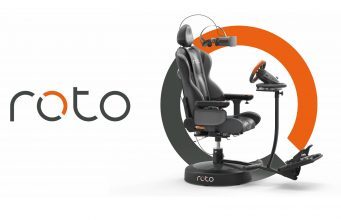
Roto VR, the UK-based makers of the eponymous 360-degree VR chair, today announced its completed a £1.5 million (~$1.86 million) funding round. Investors include Consumer Venture Capital Trust, Pembroke VCT, and The TVB Growth Fund.
You may remember Roto VR from the company’s 2015 Kickstarter which was unfortunately cancelled after it fell short of its £85,000 (~$105,000) goal. Although the time was seemingly too early in VR’s consumer life cycle for such a device, its founders, Elliott Myers and Gavin Waxkirsh, pressed on with their mission of bringing the rotating VR chair to market.
Roto VR is touted for its ability to lessen motion sickness with its motorized auto-rotate function, avoid tangled cables with its integrated rotator cuff, and give the user a measure of haptic feedback as well.
“In [CEO Elliott Myers] we have found an entrepreneur who has solved a problem for the VR market with a solution that addresses the physical issues encountered whilst consuming VR content, as well as significantly enhancing the experience,” said Andrew Wolfson, CEO Pembroke Investment Managers LLP. “We see future customers coming from both the B2B and B2C markets, in fields such as experiential attractions, home, cinemas and shopping centres. The company has employed a high calibre of people, and we believe that the business is well placed to take advantage of this fast-growing market.”
The company is slated to launch the consumer and office version of the Roto VR chair soon. Roto VR, which starts at $1,500 for the chair itself, is compatible with many consumer VR headsets.
Roto VR tells us they’ve since identified a number of market opportunities across a select range of industries in the out-of-home sectors, such as cinemas and arcades, and has begun developing “a range of products” in response.
We’ve seen a few Spider-Man swinging demos on the Quest and PC VR (both official and non-official), but now an upcoming VR game is set to take fun web swinging mechanics and apply them to an arcade-style arena shooter with a brand new property.
SWARM is an upcoming title from Greensky Studios, releasing Summer 2020 for PC VR and Oculus Quest. As you can see in the recently-released trailer embedded below, the game is a frantic arcade shooter that employs Spider-Man-like swinging mechanics for what looks like a whole lot of hectic fun. “Armed with just a grappling hook and your handy pistols, you’ll be plunged into a flow state as you grapple, shoot and battle your way to the heart of the SWARM before it’s too late,” reads Greensky’s description.
“The gameplay is fast-paced and intense,” said Peter Le Bek, founder of Greensky Studios. “You’re moving all the time, swinging through explosions, plunging down on enemy bots while showering them with fire. It’s the most intense movement experience you can have in VR without getting dizzy or motion sick.”
Le Bek says the team spent four months iterating on the grappling system alone, to make it feel satisfying, before fleshing out the rest of the game. They made a breakthrough when they added elasticity and tension simulation to the rope, making it feel “more like Spider-Man.” From there, they settled on an arena shooter genre to implement their grappling mechanic, resulting in SWARM.
“We were really worried that the movement would be too intense for most people,” said Bek. “So when we tested with everyone in our office – most of whom had never tried VR before – we were really surprised that no one complained about motion sickness.” After further testing with “hundreds” of VR newbies and veterans, Le Bek says they’ve still had no complaints about nausea, but have added comfort settings just in case.
We’ll have to take his word for it for now. SWARM releases Summer 2020 for PC VR via Oculus and Steam, as well as on the Oculus Store for Oculus Quest. SWARM will also be cross-buy between Oculus Rift and Quest.