The SideQuest team announced that a v10 update is coming for the popular application that facilitates and curates sideloaded Oculus Quest content.
The new update will improve visibility for apps that receive new builds, so users can easily identify and install updates to applications they have sideloaded on their Oculus Quest.
Announced on Reddit, version 10 will be the next big update for SideQuest, which is skipping version 9 and going straight from v8 to v10. While the last big update for SideQuest saw a graphical overhaul, this update will largely focus on behind the scenes changes with some minor user improvements.
The biggest of these is a feature that will notify users, via the menu bar, when a sideloaded app has received a new version since they installed it. This will help users to update their sideloaded apps on their Quest to the latest version with new features or improvements. In the current build of SideQuest, there is no functionality like this and users only know if an app has received a new build if they see news about it elsewhere or manually look it up on the app listing.
The new update will also coincidence with better server infrastructure for SideQuest, which will mean speedier load times and less chance of outages, (of which there have been two in the last few months, for brief periods of time).
A new VR massively multiplayer online role-playing game (MMORPG) is on the way, and it’s making some hefty promises.
Archgate: Pride & Accomplishment is a VR-exclusive title from Samdosoft. Unlike other attempts at the VR MMO such as Orbus Online, the game is played from a third-person perspective that aims to marry in-depth combat with social elements. Check out its ambitious (to say the least) trailer below.
As you can see, the game is set in a dark fantasy world in which players can team up to take on quests. But the developers want to go far beyond the conventional VR MMO.
“We set out to challenge and improve the current status quo in the gaming industry on multiple fronts,” Samdosoft says on the game’s website. “Archgate introduces roleplay-as-a-service, features permadeath regions, and places a strong emphasis on both player individuality and reputation.”
One of the game’s loftiest promises is that Samdosoft will employ game masters that can spawn enemies at will to give quests a more dynamic feel. The team also intends to use live actors to embody the game’s NPCs. We asked the studio how this was possible.
“We won’t need thousands of employees because the core systems like fighting for territory, politics, tournaments and day to day gameplay is built to work on its own,” the studio told us. “The moderators are a cherry on top making it unpredictable. Also we have a single-shard server infrastructure and we will limit the maximum number of maximum active subscriptions so we always know we can provide high quality experience for players in-game.”
On the game’s FAQ page the studio says player subscriptions will be available “In the order of thousands.” Elsewhere, Samdosoft wants to deliver political systems, crafting and housing, whilst doing away with less welcome elements like microtransactions.
Archgate is aiming for full release in 2021, with closed beta and alpha testing in 2020. For now, it’s in development for PC VR headsets, though the developer says it will look into bringing the game to PSVR, perhaps after PS5’s launch.
That’s the longest I’ve ever been able to wear an Oculus Quest before ripping it off my head in pain. If I’m being honest, I hated using my Quest because it was so uncomfortable. It sat next to my bed for months, the controllers and charger tucked away on my headboard shelf. But while I hated the Quest, I did appreciate and love the concept of what it was, and what it meant for VR.
The VR Power is a 10,000mAh battery that weighs 9.7 ounces (roughly 0.61 pounds), providing not only a better battery life, but also acting as a counterweight for the Oculus Quest. Some people have concerns that the battery will “overheat and explode” or “break your neck,” but after extensive testing, I can confirm that never happened. If anything, the VR Power makes the Quest feel like a more appropriate weight, as it doesn’t allow the headset to tip forward on your face.
VR Power: What’s In The Box
The box comes with the battery pack, two cable management clips, and a short USB-C to USB-C cable to connect from the VR Power to the USB-C port on the side of the Quest. The cable management clips are attached with velcro-style fasteners; they fit and fasten perfectly, so there’s no need to worry about it getting caught on your hair. Getting the USB-C cable into the clips requires a bit of force, but once they’re in place, it fits securely. The straps that fasten the VR Power to the bottom of the head strap are also perfectly measured, and never irritated the back of the head, or got caught on my hair.
VR Power’s power button in the center also acts as a battery indicator. Going counterclockwise, quadrants will turn off to signify a loss in 25% of battery life per quadrant respectively. It has three USB-C ports on the top: from left to right, a 1 Amp port that can be used to charge other accessories, a 3 Amp port to charge the Quest, and the charging port for the VR Power itself. By having the shorter cable hooked up in the middle port, you can use your Oculus Quest charger in the far right port to charge both at the same time.The battery pack was delivered with about 75% charge, and my Quest was completelydead, so I charged them overnight before conducting the review.
Nine hours, twenty one minutes, and thirty six seconds.
That’s how long I spent in an Oculus Quest in a single day. I know it was exactly this long because I used multiple timers to record my exact play time. Over nine hours is a long time. Most people don’t even get to sleep for that long. You could fly from London to Boston and still have time to spare. You could watchThe Hateful Eightthree times. But with a fully charged VR Power and Oculus Quest, I was able to enjoy that much time in virtual reality.
The port covers are each clearly labeled: Output 1 Amp, Output 3 Amp, and Input.
Testing The Battery
I made sure to test it for that long because Rebuff Reality claimed that the VR Power would give users up to eight hours of gaming, and up to ten hours of streaming (if using a fully-charged Quest).
Disclaimer: We do not advise anyone to be in VR for extended periods of time. Moderation is key, as-is taking breaks regularly. If you begin to feel sick in VR, remove the headset and take a break. For more information on how to overcome VR motion sickness,click here.
To test the lofty battery life claims, I decided to do a mixture of both VR gaming and video streaming. I started off with playing A Fisherman’s Tale, which took me roughly three and a half hours. After that, I watched a few episodes of Arrested Development on Netflix, and then dragged our News Writer, Harry Baker, into the experiment for some help. Around the seven hour mark of my testing, Harry set up a custom room in Bigscreen, where we looked through his Spotify playlists via Virtual Desktop, and played a few rounds of Pictionary using Bigscreen’s 3D drawing tool.
After saying goodbye to Harry and being grateful for the brief interaction with another human, I fired up I Expect You To Die. I tried to close out the test with Gun Club VR, but I was so exhausted at that point, I went back to Netflix after 20 minutes.
Analyzing The Effects
While I started to fade mentally from being in VR for that long, I wasn’t in a lot of physical pain. Roughly at the five hour mark was when my forehead started to hurt on one side. I had to readjust the straps a couple times, but was able to get back to it without issue. At the end of the nine and a half hour test, I had a very small headache. Dismissible, even. It went away within half an hour.
For those of you who have the same issues I did with the Oculus Quest (the headset being incredibly front heavy, pinching the nose, squishing the face), the VR Power does a fantastic job of evenly distributing the weight. If anything, I felt my Oculus Quest was lighter. I never felt like it wasn’t secure, either. I stress-tested the stability by skipping around outside, jumping, headbanging, and running. Not once did it feel like it was going to fly off, or have the straps come undone.
To test out how it held up during high motion activity, I played a handful of OhShape rounds. If you’re unfamiliar with OhShape, it’s a fusion of Beat Saber and Tetris (but with your body instead of blocks). I was surprised at how much of a workout it actually was! The game has you lifting your arms, doing squats, moving from side to side, punching, and catching objects. It may seem like an easy concept, but the way the game has you move your body really uses your body’s weight for a good workout. You can check out our full review here.
The VR Power weighs 9.7oz / 275g. The unit was weighed several times on different surfaces to ensure accuracy.
The main issue with the Oculus Quest for me is that the headstrap does not sit low enough on the back of my head. While the VR Power doesn’t drastically fix this, it keeps the headset in place, and the weight is perfect for lifting the pressure off my face. I was a bit worried that playing OhShape would call for me having to adjust the headset several times, but it stayed securely in place. It didn’t slide from side to side, or scoot up on my head. I know I need to be more active and do some exercising. Now that I’ve tried OhShape with the VR Power, I’m actually motivated to do so.
While it’s understandable to assume having a battery pack attached to the back of your skull is going to cause some temperature issues, the VR Power never seemed to get hot. Using it for nearly nine and a half hours straight, I didn’t feel I was in any danger of it exploding, and I never felt its temperature rise. After entirely depleting the battery, I timed the total charge time to full, which is indicated by a solid, lit up circle around the power button.
The charge was rather slow, clocking in at about six hours and five minutes using the Oculus Quest power adapter and charge cable. This may seem frustrating for some, and it was for me at first, but I suspect it charges slow for a specific reason. Although this is just a theory (and I’ve only done a single complete 0% to 100% charge), I feel it charges slow to not build up any unnecessary heat, and preserve the overall life of the battery. Realistically, I’m not sure how many times users would fully deplete to the degree I did for the review and do a complete charge.
VR Power Review: Final Verdict
4/5 Stars | Really Good
The only downside we could find with the VR Power is that it isn’t compatible with Oculus Link. When I asked Rebuff Reality about this, they let me know that, “VR Power is optimized based on Oculus Link charging specifications, however, it is not able to pass through data from your computer to the Oculus Quest.” This means that you can’t use the VR Power as a battery device while you’re using Oculus Link, but you can still keep it attached to use as a counterweight for comfort.
The battery life claims made by Rebuff Reality are true, it’s easy to install, and it makes the Oculus Quest not only wearable for me, but actually comfortable. For people who want more battery life out of the Quest, or want more comfort for long hours of playing and developing, the VR Power is easily one of the best Oculus Quest accessories on the market.
This review was conducted with a VR Power unit provided by Rebuff Reality. For more information about how we arrived at this score,check out our review guidelines.
Fictional portrayals of virtual worlds such as “Ready Player One” and “The Matrix” typically portray the physical and virtual worlds as distinct realms siloed from each other. Characters escape a dystopian, impoverished physical realm and enter a separate, utopian virtual realm in which they are wealthy and important.
Our non-fictional future won’t have that dichotomy. One main reason is money. Any virtual world has a virtual economy, and when that virtual economy gets really big, it integrates with our real-world economy. That is in equal parts due to market forces and government intervention.
This is part six of a seven-part series about “multiverse” virtual worlds. We will explore the dynamics of games’ virtual economies, the exchange of virtual assets for real money, challenges with money laundering and underage gambling, the compliance infrastructure needed for virtual economies, and the challenges in balancing a virtual economy’s monetary supply.
What separates virtual from “real” is the ability to make money
To many people, the idea of spending time in virtual worlds amassing in-game currency and trading goods still sounds like the geeky science fiction hobby of someone who needs to “get a real job.”
Our society gauges the worthiness of pursuits based on their social and economic productivity, and most people don’t view virtual worlds as productive places. As more people find enjoyment in virtual worlds and respect people with accomplishments in them, however, vying for accomplishment with those worlds will increasingly be viewed as socially productive. As more people start earning an income through work in virtual worlds, perception of economic productivity will quickly change, too.
Virtual worlds will be viewed as digital extensions of “the real world” and working a full-time job in a multiverse virtual world will become as normal as someone working in a social media marketing role today.
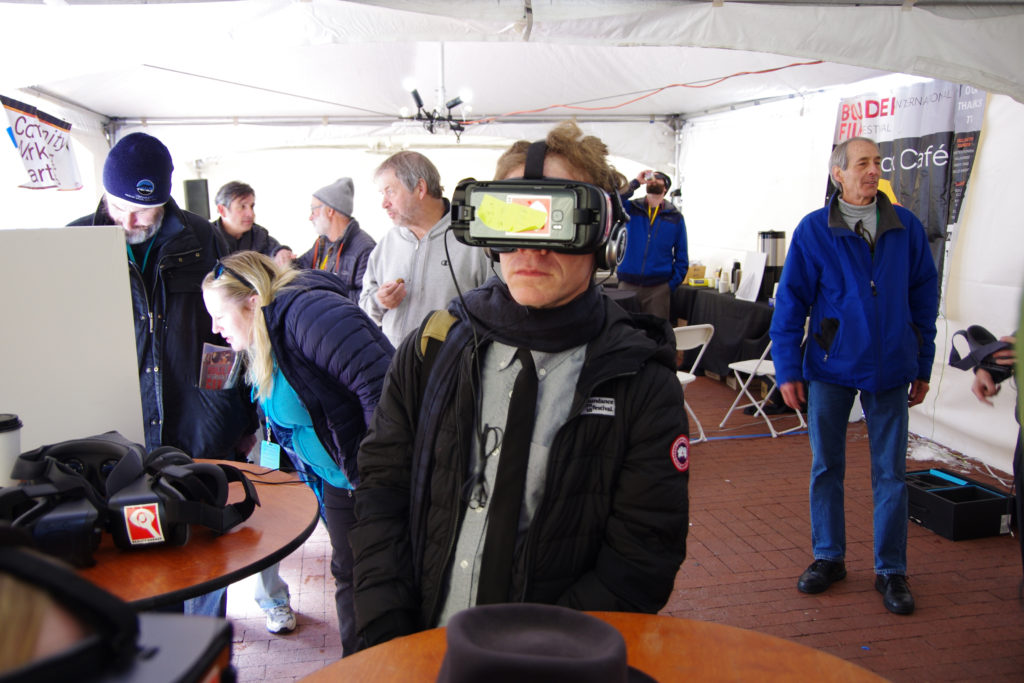
VR and AR take center stage at this year’s BIFF in Colorado.
The Boulder International Film Festival (BIFF), which takes place in Colorado next week, is widely recognized as one of the world’s coolest film festivals.
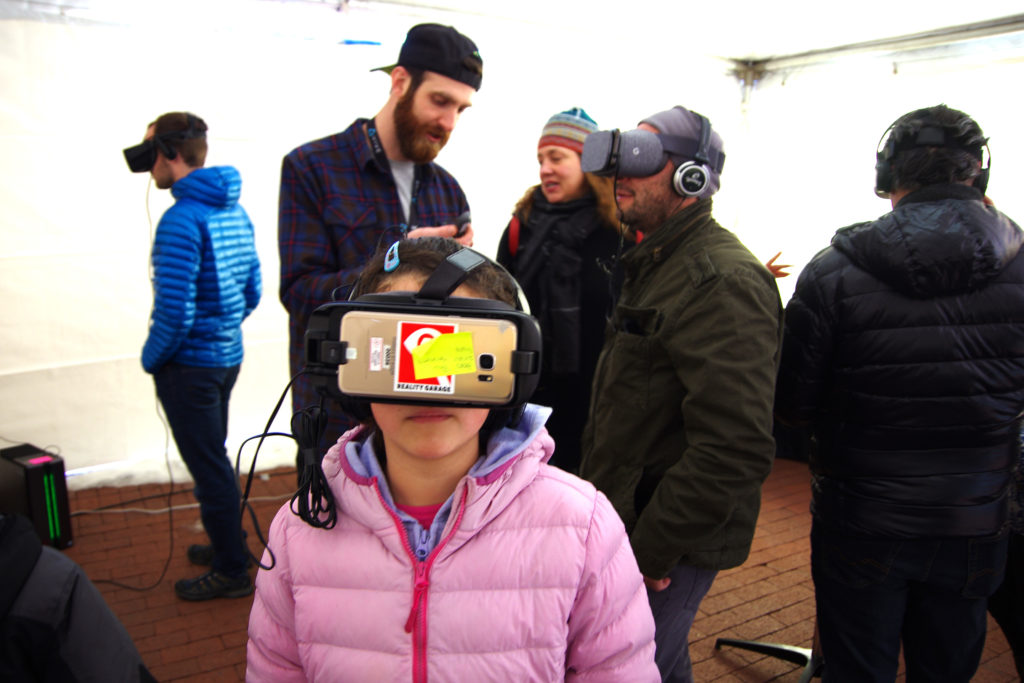
This year is the first time the event is dedicating an entire pavilion to XR experiences, a move that celebrates the evolution of storytelling and recognizes the integral role technology plays in filmmaking. It will feature curated VR films and AR art from around the world, an opening kick-off party, industry meetups, interactive workshops, and the Boulder XR Science Fair highlighting VR and AR innovations from local university labs, tech teams, and professionals.
BIFF attracts more than 25,000 film enthusiasts, media and industry every year. Now in its 16th edition and celebrating 100 years of cinema to boot, they are still keen to look to the future as much as celebrating the past. Featured films will include Disney’s Cycles and Myth: A Frozen Tale as well as keynotes and events where you’ll get to hear from Disney Animation creatives Jose Luis Gomez Dias and Jeff Gipson.
“The future of storytelling will be an amazingly new and exciting experience that we can’t even imagine today,” said Kevin Smith, Executive Producer for BIFF. “The XR Experience provides a glimpse into this ground-breaking new medium while providing a great community event to mix, learn and experience.”
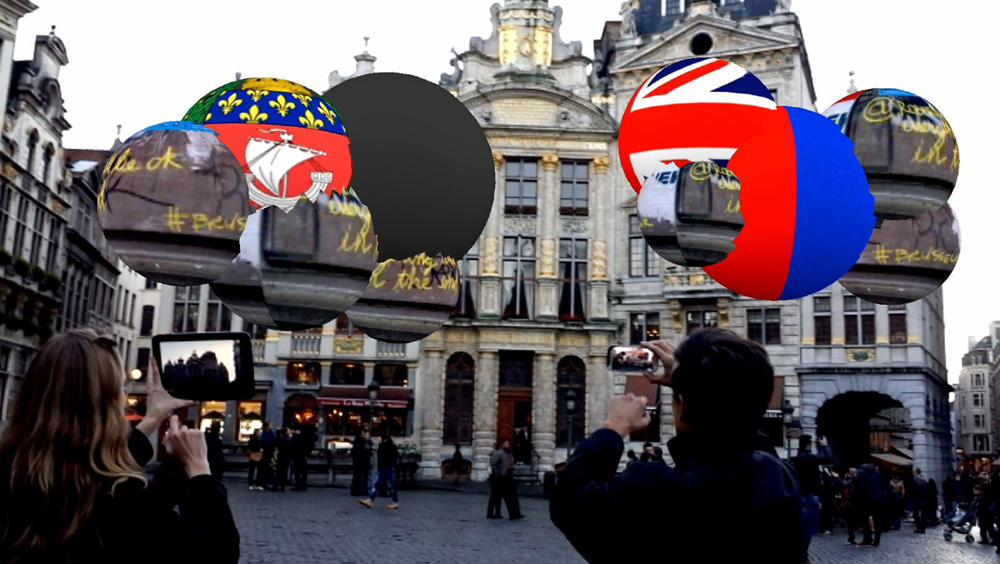
The pavilion space will also prominently feature a retrospective of large-format AR artworks from 2011-2018 by HEAVY, an award-winning creative studio that specializes in using immersive technology to reclaim public spaces for civic engagement, enlightened interactivity, and fun & thoughtful experiences. The HEAVY team manages to do this mostly through large-scale art installations that utilize XR technologies to explore the intersections between philosophy, art, and design, utilizing the talents of a mixed group of developers, artists, and academics.
Since 2011, the company has pioneered the use of AR technology to engage audiences with fine art installations that explore the building tensions created by a historically analog world quickly transitioning to digital life. Their installations have not only graced events such as SXSW and Google i/o, but also taken over Times Square, a UNESCO World Heritage Site in Brussels, the Hollywood Walk of Fame, Wynwood Walls in Miami, and the iconic Bowery Wall in New York.
“It’s really nice to get this recognition for our traditional body of work from over the years, but it’s also a reminder of how far XR has come, both in terms of the tech itself and also as a compelling storytelling and artistic medium in its own right,” says Chris Nunes, Head of Studio at HEAVY.
The high demand for truly innovative experiential art is illustrated by the fact that the Van Gogh Museum in Amsterdam recently lost its top place as the most popular single-artist museum to Tokyo’s MORI Building DIGITAL ART MUSEUM: teamLab Borderless (or “Borderless” for short). This is a trend that Nunes believes will start gathering significant momentum over the coming months and years as technologies and creative approaches to using them continue to evolve and become more ubiquitous.
“I was at the Tate Modern gallery in London recently and I got really excited imagining the possibilities of making a dedicated art installation for such an amazing, forward-thinking cultural institution. We’ve been engaging with people in urban environments for years as they go about their daily lives, and that’s fantastic, but I think we [in the XR industries] have reached a real tipping point where artists and art fans are actually purposefully seeking out these experiences because of what they add to our understanding of reality and each other’s perspectives. These technologies live with us -in our pockets, under our pillows- and rightfully, are becoming an integral part of the artistic spark and expression, as opposed to something simply added onto the underlying art,” he concludes.
At the BIFF retrospective for HEAVY, visitors will get to experience a range of the studios’ most popular installations, such as More Human Than Human [MHTH]. It’s a fascinating use of data visualization and AR that debuted in 2018 in Moscow’s Zaryadye Park. The team took datasets from the City of Moscow’s Open Data Portal – specifically, the latitude and longitude of every theater, exhibition hall, and museum in Moscow – and digitally interconnected those waypoints with a 3D lattice that was meshed over a skull model. The idea they wanted to represent through the artwork was that our society’s sense of “self” has become increasingly defined by the accumulation, aggregation, and interpretation of massive amounts of personal data.
“With the rise of ever-present high-powered mobile devices, social media, and artificial intelligence, our own personal data has become a digital avatar that often carries a higher degree of perceived value than our physical presence,” HEAVY Creative Director BC Biermann explains.
Also featured in the exhibit is Digital Neuron, which was originally commissioned by the University of Geneva in Switzerland in 2016, and has since won an Auggie at the Augmented World Expo (AWE), was a 2019 Merit winner in education and named a Top 100 Artistic Destination award by CodaWorx. The piece depicts the neuron’s central importance in human cognition and as the deeper engine of medical research, also using neurons as a visual metaphor for how ideas are spread between people.
Parabola is yet another interesting interactive mural included in the retrospective. Featured originally in San Francisco’s Design Week 2017, it depicts a fractal background with a digital sculpture of a chair in the foreground built by impossibly interlocking and twisted parabolas (the parabola is a foundational design form found in everything from natural forms to product design and DaVinci sketches). Using AR, you can change the scene by moving the chair to different parts of the virtual room, altering the colors and lighting of the space, or by exploding the entire suite as a form of design protest.
In the meantime, the HEAVY team continues to push the envelope creatively. They’re just putting the final touches on a 3 sculpture installation for the newest JW Marriott 5-star hotel in Anaheim which marks the first time they have integrated custom-made 3D sculptures with an AR experience. As far as Nunes and Biermann know, this installation is the first of its kind.
The BIFF XR Experience will be free to attend and runs from March 5th to the 7th at tech co-working space Galvanize with the VR Theater moving to the main Festival Tent for a few hours on Sunday, March 8.
The Guardian boundary is one of the staples of any Oculus Quest experience and, in most cases, an essential one. It keeps you safe, away from walls and obstacles, and confirms you’re still within your desired play area. However, there are some niche instances where you might want to disable your Guardian boundary. Here’s how to do it.
Some forewarning: disabling your boundary also disables the headset’s positional 6DoF tracking. This means that when you physically move your head through space, the virtual world will seem locked to your head and move around with you. When the Guardian system and tracking are turned off, the Quest only tracks its position in 3DoF (just like an Oculus Go) instead of the regular 6DoF tracking.
This can be very disconcerting to some people and we recommend you only turn off the boundary in situations where you’ll remain stationary.
But why?
In most cases, you don’t want to disable your Quest’s Guardian boundary. Certain situations, however, lend themselves better to 3DoF without a guardian — mainly media consumption.
For example, the Quest requires a well-lit room to operate the tracking and Guardian systems. If you wanted to watch a movie on your Quest in a dimly lit or completely dark room, this normally wouldn’t be possible. However, turning your boundary and tracking off will mean you can sit in a dark room and watch a movie without worrying about the Quest losing positional tracking.
Disabling tracking and the boundary is also useful when using the Quest while in bed, or when on a plane or in a car where turbulence and/or movement might wreak havoc with positional tracking.
Disabling the Guardian and tracking system
Disabling the Guardian and tracking system on the Quest is fairly simple:
1. Go to the full settings menu on your Quest by clicking Settings and then ‘See All‘ on the bottom menu bar in the Quest Home.
2. Select the Device tab and scroll to the bottom.
3. Turn the Tracking switch off to disable your Guardian boundary and positional tracking.
Your Guardian boundary is now disabled and your Quest’s positional tracking is off. While your boundary is off, you can reset the orientation of the Quest’s view by holding down the Oculus button on the bottom of the right touch controller.
To turn your Guardian and tracking back on, simply navigate back to the same settings menu, switch the tracking option back on and confirm your Guardian boundary.
That’s everything you need to know to disable your Quest’s guardian boundary and positional tracking. If you have any problems or questions, let us know in the comments below.