The emulated version of The Legend of Zelda: Breath of the Wild (2017) is getting an unofficial mod this week that will bring full 6DOF PC VR support to the game.
The News
Created by ‘Crementif’, the BetterVR mod for BotW promises to bring fully stereo-rendered, 6DOF VR support to the Cemu emulated version of the game, including full hand and arm support for things like wielding weapons, torches and Bokoblin arms.
Notably, the mod is designed for the Wii U version of BotW, which comes with the usual provisos of requiring a legal copy of the game—no game files are supplied in the mod. Additionally, because it’s using Cemu, the popular Wii U emulator for PC, the VR mod also boasts a large list of mod compatibility.
“While I put a lot of effort into this mod, not everything works. Expect some jank that’ll be resolved over time,” Crementif says. “AMD graphic cards might not be supported (at launch at least). During testing we could not get it to work on an AMD system due to a driver bug.”
Crementif notes that performance will “not be as good as a native VR title due to CPU-heavy emulation,” additionally saying that frame interpolation made it “very playable” on a few test systems quoted below:
i9-13900K, RTX 4090, 32 GB RAM, Pimax Crystal Super
Ryzen 7600x, RTX 3060 12GB, 32GB RAM, Meta Quest 3
BetterVR is releasing as an open source project on December 30th, and will be freely downloadable from Crementif’s GitHub.
My Take
At least from test footage, the VR mod for BotW predictably appears to suffer from a few of the same issues seen in emulations of the game on flatscreen, notably jumpy frame rates and inconsistent texture loading. I’m excited, but definitely keeping my expectations in line with whatever weirdness pops up inherent in the emulation process.
Still, by the looks of it, VR interactions in BotW look pretty magical: things like cutting down trees, slicing Bokoblins, and shielding yourself from incoming strikes all seem to be great fits for immersive interactions.
Don’t get your hopes up for a VR adaptation of Resident Evil Requiem, the next survival horror from Capcom. The studio says it currently has “no plans” on the subject.
The News
As mentioned in a Q&A with the game’s producer Masato Kumazawa (Minimap, via Reddit), Resident Evil Requiem isn’t aiming to release on VR headsets like it has with earlier entries in the series.
“At this time, there are no plans to bring any parts of Resident Evil Requiem to VR platforms,” Kumazawa said. “However, the game can be played in a first-person perspective, allowing players to feel immersed in the experience. We also have not yet shown much of Leon’s gameplay yet, and we plan to share more details in the future.”
Resident Evil Requiem is expected to release on February 26th, 2026 across PlayStation 5, Nintendo Switch 2, Xbox Series X and Series S, and Windows PCs.
My Take
Capcom’s successive Resident Evil VR modes seems to suggest a pattern. As PlayStation 5’s best-performing titles, all of which come with free VR modes, this is about the clearest picture we can get of the headset’s respective adoption rates, suggesting that VR player numbers on the platform have dropped significantly from PSVR 1 to PSVR 2:
Resident Evil 7: Biohazard (2017): original PSVR mode released concurrently with the game’s launch on PS4, attracting 1.25 million confirmed VR players. Never ported to PSVR 2.
Resident Evil Village (2021): PSVR 2 mode released nearly two years after launch. No public numbers available, although Capcom said shortly after release a “large majority” of PSVR 2 owners played.
Resident Evil 4 Remake (2023): PSVR 2 mode released eight months after launch, attracting 244,000 confirmed VR players to date.
While it’s impossible to know whether Sony actively funded long-time partner studio Capcom to create those VR modes—and could possibly be refusing to do so with Capcom’s next RE title—it’s pretty clear Capcom isn’t making the same sort of bets on PSVR 2 that it once made on the original PSVR.
Photo by Road to VR
And it probably has a lot to do with Sony’s lack of content support after the launch of PSVR 2. The only major Sony-funded exclusives for PSVR 2 were Horizon Call of the Mountain (2023), Firewall Ultra (2023), and Gran Turismo 7, which includes a VR mode. Not much else.
Granted, the platform has managed to attract many of the same games playable on Quest and PC VR. That, and the once-difficult purchase proposition at its $550 launch price isn’t nearly as bad nowadays; it can be purchased for $400 or less when on sale. Not a bad deal if you own a PS5 already.
Still, I don’t expect to see anything resembling Sony-led push to promote PSVR 2 ever again, and the fact that the company’s closest allies aren’t either is nothing short of damning.
Personally, the final nail in the coffin was how Sony untethered PSVR 2 from its PS5 console ecosystem. An optional wired adapter now allows headset owners to play SteamVR games—a pretty clear sign that Sony is no longer interested in funding, supporting, or promoting PSVR 2 in any capacity.
Nearly a decade after consumer VR took its first real steps—driven by headsets like the Oculus Rift, HTC Vive, and PlayStation VR—the medium has outgrown its novelty phase.
Those early platforms reshaped not just how players experienced games, but how studios thought about presence, interaction, and scale. Today’s VR games and experiences walk along that groundwork—and are also judged against it.
With expectations higher than ever, this year’s standout titles aren’t just impressive in isolation. They’re the ones that meaningfully build on what came before—and that’s what this year’s awards aim to recognize.
Without further ado, here’s Road to VR’s 2025 Game of the Year Awards:
Fireproof Games is one of the most trusted names in VR puzzle-adventures for a reason: it’s the very same behind The Room series—arguably one of the best puzzle-adventures on any platform, VR or otherwise. And Ghost Town feels like the most impressive to come from the studio, which is saying a lot.
From its inspiring and immersive environments, to its well-animated characters, to its engaging story, Ghost Town seems to nail all of the most important factors in how to transport players to a different world—one that feels alive, carefully considered, and visually cohesive.
Crucially, Ghost Town’s puzzles aren’t the most difficult, although they’re always approachable and satisfying, encouraging observation and light experimentation. They’re sort of temporary safe havens from the dark, moody atmosphere Ghost Town so effortlessly exudes.
While the game looks absolutely stunning on Quest and PSVR 2, Ghost Town doesn’t treat PC VR as a second class citizen, offering up dynamic lighting, reflections, fog, detailed particle effects, and higher resolution textures throughout—easily making it the version you should play over all others.
Deadpool VR isn’t just a highly polished, multi-hour VR experience that features a name brand superhero. Or a game that lets you slice dudes in half, slow-mo kick them and explode their heads. Or a never ending barrage of fourth wall-breaking banter that isn’t afraid to motor-mouth a ton of dick jokes at anyone, alive or dead. It’s more.
Okay, actually, that’s basically all it is, but that’s more than enough!
Jokes aside, Marvel’s Deadpool VR is a milestone for VR production quality. Outside of the fun gameplay, interesting dialogue, and great graphics, Deadpool VR pushes the envelope by serving up some of the best voice acting ever—VR or otherwise.
Neil Patrick Harris is a natural fit as the ‘merc with a mouth’, but you might also be surprised to know the game features John Leguizamo, Dolph Lundgren, Kal Penn, and Tom Cavanagh among many others. All of it makes for a cinema-quality experience, which is such a refreshing change of pace.
Arken Age is a single player adventure that was clearly designed by people who have closely studied the corpus of VR game design. Developer VitruviusVR smartly built atop the shoulders of giants, learning from the best immersive mechanics of pioneering VR games like Stormland (2019), Lone Echo (2017), and Robo Recall (2017).
But they did more than just copy. They adapted and advanced what came before, while making their own contributions that are worthy of future study. And they put in the work to give Arken Age its own identity with a unique visual design, interesting weapons, and gameplay that’s all its own.
We were particularly impressed with Arken Age’s highly diegetic design. So much of the game feels ‘hands-on’ in a way that many VR games do not.
Combat features a spread of ranged and melee weapons, allowing you to make your own playstyle. And when it comes time to upgrade them, you don’t just click a button in a menu. Instead, the studio designed a full ‘upgrade station’ to make weapon upgrades and modding into an immersive experience.
Healing syringes need to be stabbed into your body, but that’s table stakes in 2025. The clever part is the way you actually craft the syringes. First you need to collect fruit from certain trees. Then when you find a crafting station you use a torch to pop the fruits off the stem and collect them into a little funnel. It’s ultimately arbitrary work, and yet so much more satisfying and fun than using a laser pointer to click a button to craft the syringes.
All of this attention to diegetic design makes Arken Age one of the most embodying and fun VR games of 2025, earning our award for PSVR 2 Game of the Year.
Building games with meaningful gameplay that adapt to arbitrary real-world spaces is an exceptionally difficult design challenge. Laser Dance is one of the few mixed reality games that feels like it actually pulls it off. It’s a genuinely fun little game and a very clever way to approach the problem of adapting gameplay for arbitrary spaces.
Laser Dance asks players to do something simple: move from point A to point B. But between you and those two places is a grid of lasers that you can’t touch without being reset back to point A. The game starts easy with static lasers to get players into the groove. But later levels introduce moving and flashing lasers which significantly increase the challenge.
Laser Dance isn’t just fun, it’s also incredibly easy to play. Even people who have never tried a VR headset can grasp the gameplay in 60 seconds or less. This is aided further by the game’s use of controllerless hand-tracking, which means nobody needs to learn how to use controllers to have fun with the game.
The successful ‘adapt to any room’ design, quick setup, and ease-of-play make Laser Dance a perfect game to share with friends. Just be sure to ‘cast’ the headset’s view to a nearby TV so everyone can enjoy the antics of the person in the headset crawling across the living room floor while dodging invisible lasers. And you might as well play the Mission Impossible theme for the cherry on top.
Reach is built atop a foundation of fun movement that makes the game fast-paced and fun, while also remaining quite comfortable. The game makes a seemingly small tweak to the usual ‘Press A to jump’ formula, and instead asks players to hold down the A button and then do an upward arm swinging motion to initiate a jump. This alone makes jumping feel a lot more embodying, and it complements the game’s movement-centric gameplay which has players running, jumping, and climbing.
Developer nDreams took things a step further still, giving the player interesting and immersive movement tools. The player gets a shield which can be thrown into specific magnetic slots in the game, creating a temporary handhold and platform. Players can also shoot arrows into special surfaces that solidify the arrows into climbable handholds. It’s a neat idea that I wish saw even more interesting use in the game.
To top it all off, players gain access to a grappling hook later in the game which allows them to pull themselves toward special poles, and to carry their momentum while swinging from one pole to another. While Reach is far from the first VR game to have a grappling mechanic, we appreciated that its particular design kept things comfortable while still enabling a sense of daring movement across large gaps, as well as an extra way to move around quickly during combat.
No Man’s Sky
Developer: Hello Games
Available On: PSVR 2, PC VR
Release Date: August 9th, 2016
We could spend the next few sentences glazing Hello Games for not only completing No Man’s Sky’s redemption arc years ago, but continuing to give VR players a front-row seat to one of the best space sims that seems to never stop giving.
We could start a second paragraph, and talk about how studio co-founder and CEO Sean Murray seemingly made it a spiritual mission to make No Man’s Sky the game it should have been when it launched in 2016.
Or even a third, talking about the game’s recent updates, which offer mind-boggling expansion to the universe, including deeper ship and multiplayer systems, franchise-level settlement management, fun exploratory mechanics like fossils, and ongoing fixes that keep improving the base experience.
But we don’t do any of that. Suffice it to say: No Man’s Sky could have received this award multiple times over by now. And at this rate, it just might in the future.
We couldn’t recommend anyone earnestly attempt to play Hitman in VR before its big PSVR 2 and PC VR update earlier this year. On the original PSVR, input was abstracted to the point it just didn’t feel immersive. On PC, it was an absolute mess. We’re not even going to talk about the standalone game for Quest.
But then developer IO Interactive got wise, and finally fixed the issue for its big PSVR 2 release of Hitman World of Assassination, finally making it a VR adaptation of the game that actually didn’t feel like a half-hearted attempt.
What’s more, those improvements eventually came to the PC version in September, adding Freelancer mode, Elusive Targets, and a host of more content, putting the PC VR version as the definitive way to experience Hitman in VR, but only by a hair.
Cave Crave is like if The Climb decided that falling from a cliff face wasn’t scary enough. It needed to be more dangerous, more claustrophobic. More real.
And there’s something uniquely immersive about Cave Crave’s enclosed spaces. Although a majority of the game’s cave systems are entire works of fiction, featuring interesting biomes and different climbing challenges to players, in September the studio introduced its first map informed by a real-world cave: the Nutty Putty Cave system.
It’s the very same that was permanently closed up after the death of caver Jon Jones in 2009. Some may construe it as exploitative, but we don’t think it is. The free update to the game is remarkably well-informed and actually treats the tragedy with due reverence.
What’s more, the Nutty Putty update was largely informed by rescuer Brandon Kowallis, who not only gave pointers to the studio on cave design, but also included an audio guide companion that plays as users explore the now-closed cave system. In all, there’s something just a little more gripping here than your run-of-the-mill exploration game. Something that lasts with you well after you take off the headset.
We don’t always reserve our Indie Development award for single-person projects, but when they’re especially impressive, and especially fun, we simply can’t help ourselves.
That’s Quantum Void, a space sim from single dev team Tactical Nounours that we could have sworn was developed by a whole team of seasoned VR veterans.
Yes, the game is still in Early Access, but it’s extremely impressive so far; it includes multiple endings, offering up multiple hours of gameplay so far in a full-realized universe that’s actually worth exploring and scrounging through. As it is today, it’s a very polished and ostensibly finished experience, which makes it even more exciting to follow.
Note: Games eligible for Road to VR‘s Game of the Year Award must be available to the public on or before December 19th, 2025. Games must also natively support the target platform as to ensure full operability.
What’s likely to be the best sale on Quest 3S this holiday season comes bundled with enough goodies to drop the effective cost of the headset to an unheard of $91.
Best Buy now has what’s likely to be the best sale on Quest 3S (128GB) that we’ll see this holiday season, and one of the lowest effective prices we’ve ever seen on a brand new Quest of the latest model. Below you’ll also find the best holiday sale on Quest 3S (256GB) and the higher-end Quest 3 (512GB).
Best Meta Quest 3S (128GB) Holiday Sale: Best Buy – $50 discount + $159 in bundled value
Quest 3S (128GB) is usually $300. This deal drops the base price to $250, and on top of that includes $159 in bundled value, making the effective sale price just $91, which is a whopping 70% discount.
Note: Quest’s VR controllers aren’t compatible with Xbox Game Pass. If you don’t already have a wireless gamepad, you’ll need to get one in order to make use of the Game Pass Ultimate subscription. The included $75 gift card conveniently covers the cost of a brand new Xbox controller from Best Buy.
Best Meta Quest 3S (256GB) Holiday Sale: Best Buy – $50 discount + $149 in bundled value
If you’re looking for the 256GB Quest 3S model, the deal is nearly as sweet.
Quest 3S (256GB) is usually $400. This deal drops the base price to $350, and on top of that includes $149 in bundled value, making the effective sale price $200, which is a 50% discount.
Best Meta Quest 3 (512GB) Holiday Sale: Amazon – $154 in bundled value
For those wanting the best Quest experience, Amazon has a great last minute deal on Quest 3 (512GB).
Netflix announced it’s acquiring Ready Player Me, the avatar creation platform, which the streaming giant hopes to leverage soon with the rollout of user personas across Netflix Games.
The News
Terms of the deal were not disclosed, according to TechCrunch. It’s said however the Estonia-based startup’s team of around 20 people will be joining the company.
This won’t include three of the four founders: Haver Järveoja, Kaspar Tiri, and Timmu Tõke though. Only CTO Rainer Selvet is moving to Netflix, a spokesperson told TechCrunch.
“Our vision has always been to enable avatars and identities to travel across many games and virtual worlds,” Ready Player Me CEO Timmu Tõke said. “We’ve been on an independent path to make that vision a reality for a long time. I’m now very excited for the Ready Player Me team to join Netflix to scale our tech and expertise to a global audience and contribute to the exciting vision Netflix has for gaming.”
Image courtesy Ready Player Me
Additionally, Ready Player Me announced its taking avatar creation services offline starting January 31st, 2026.
Founded in 2014 in Tallinn, Estonia, Ready Player Me has allowed for users to create and export avatars across a variety of Web2 and Web3 platforms, including VR social platforms such as VRChat.
Over the past decade, the company has raised $72 million from venture capitalists a16z, Endeavor, Konvoy Ventures, Plural, and various angels, including the co-founders of companies like Roblox, Twitch, and King Games. Its most recent investment was in 2022, when the company closed its $56 million Series B.
My Take
Netflix hasn’t intimated it’s getting into XR gaming yet, so it’s pretty safe to say the Ready Player Me acquisition and subsequent shutdown is more or less a blow to one specific group of people: namely, VRChat users.
VRChat beginners looking to make their own avatars over the years were almost always pointed to Ready Player Me, with the platform even allowing users to upload a personal photo and generate a cartoony persona that was easy to mix-and-match with a variety of parts.
And while they weren’t always the most original avatars out there, it’s difficult to argue with the platform’s ease of use, as the web-based tool basically got you a (mostly) unique avatar that was not only cross-platform, but also already rigged for VRChat.
For now, VRChat only points users to two platforms: Ready Player Me and MakeAvatar. In addition to diving into make suites like Blender, those in the community also tend to get avatars by buying or finding them directly in-app, or finding them for free on platforms like VRCMods. Others rely on maker spaces like Gumroad and Booth for commissioned and pre-made avatars.
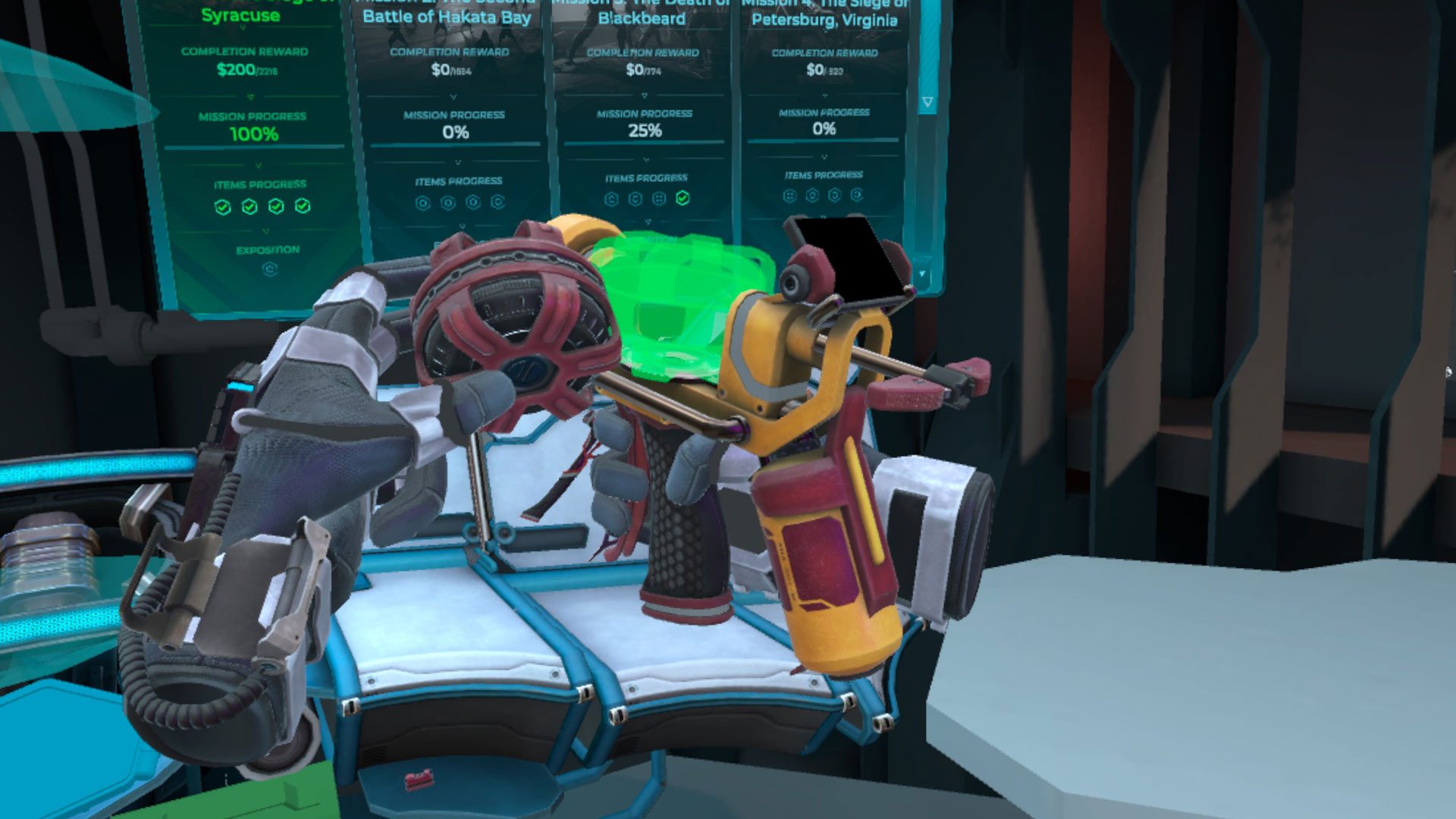
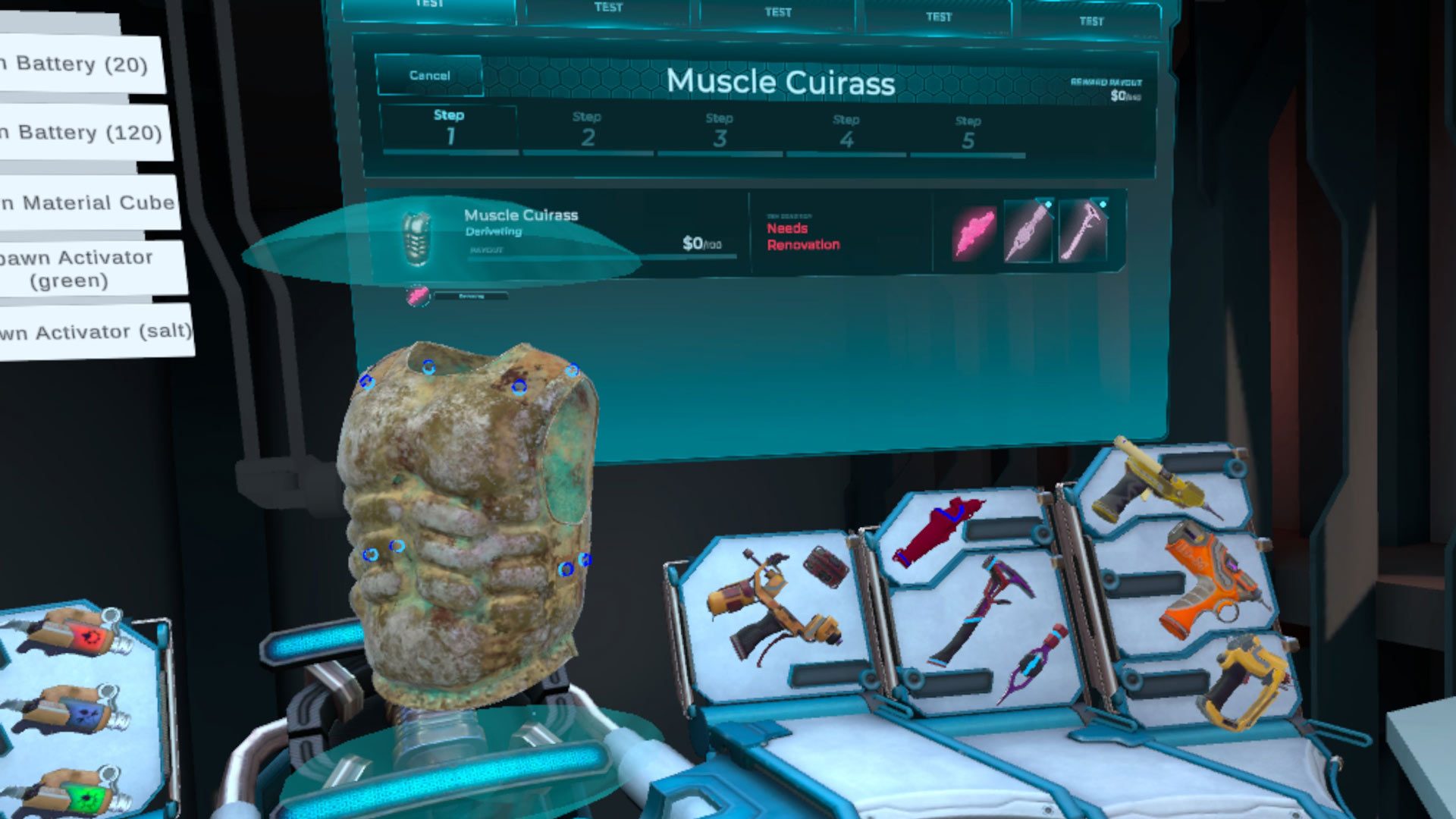
BattleCrafter is all about restoring the weapons and armor of old, letting you get a closer look at everything from ancient swords to modern rifles, and learn about them too.
Developed by VR Factory Games, the studio known for Bartender VR Simulator (2018) and Workshop Simulator VR (2025), BattleCrafter VR puts in the shoes of the galaxy’s top restoration specialist who is tasked with bringing humanity’s greatest battles back to life.
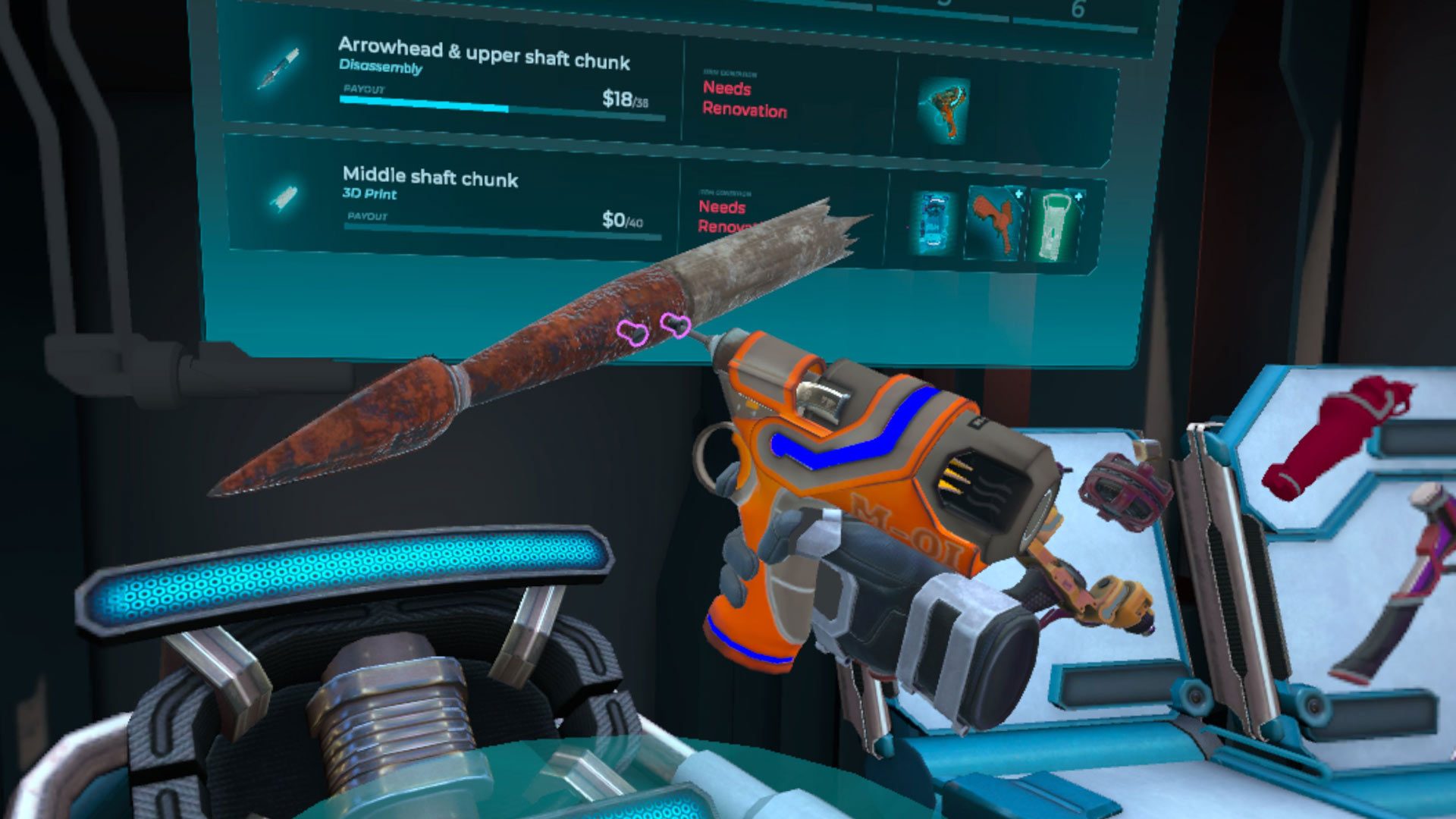
Using futuristic tools, you’ll rebuild weapons, armor, and war artifacts, then showcase them in Mars’ massive War Museum domes.
1 of 3
Image courtesy VR Factory Games
Image courtesy VR Factory Games
Image courtesy VR Factory Games
Missions require you to restore four key historical artifacts and install them inside massive multimedia domes that recreate iconic battles.
The better your craftsmanship, the higher your reward, which you can reinvest into advanced workshop upgrades like 3D printers, magnetic assembly platforms, and laser welding tools, the studio says.
You can find BattleCrafter VR exclusively on the Horizon Store for Quest 2 and above, which is priced at $20. At the time of this writing, pre-order is still available, which brings it to $14, a 30% discount.
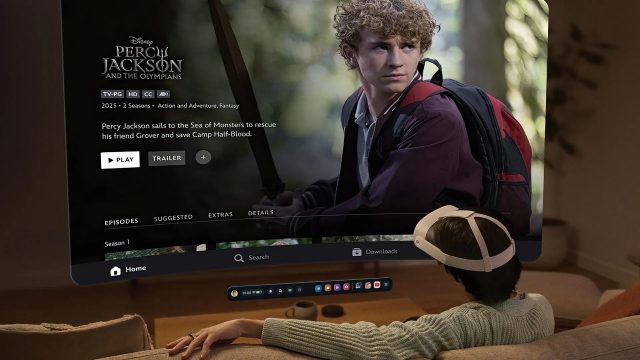
The Disney+ video streaming service is finally available on Quest. While better late than never, it’s actually missing out on a few key features for now.
The News
The Horizon Store finally has it own dedicated Disney+ app, which supports Quest 2, Quest 3 and Quest 3S. The app lets you stream the full catalogue of 2D videos on Quest and also download and replay them when offline.
While most content is served up in 1080p, the app also includes select titles in Dolby Vision 4K HDR on Quest 3/S (streaming only), as well as a limited selection of content from Hulu and ESPN.
There a few caveats though. For now, the app is US-only; Disney says it will rollout international availability in early 2026. What’s more, it’s lacking the ability to stream 3D film, like the Apple Vision Pro app does, which came to the headset in 2024 as a launch day feature.
Disney notes that “all content is only available to stream in 2D on Quest devices at this time,” which does seem to leave some room for hope in the future though.
Notably, on Vision Pro, Disney+ subscribers can stream a variety of recent films, including Avatar: The Way of Water, Avengers Endgame, Doctor Strange in the Multiverse of Madness, Frozen II, Star Wars Episode VII, and Encanto.
My Take
There doesn’t seem to be any real downside to Disney eventually allowing its 3D films on Quest, which could mean it likely comes down to a few scenarios: Apple may have timed exclusive rights to 3D movies from Disney, or maybe the films have been specifically mastered in a Vision Pro-specific format that can’t be streamed directly to Quest. There’s no saying for now.
Either way, Disney has definitely hit the nail on timing by bringing its (mostly) full app to Quest; new Quest users will likely be looking for all of the same apps they might find on a smart TV, which Quest sadly doesn’t really have yet though, giving Disney some more visibility over competing platforms.
For now, Quest users looking to stream from Netflix, Hulu, Max, Paramount+, or Apple TV need to sign in and stream in Quest’s built-in Internet browser. Native XR video streaming apps include Amazon Prime Video, Peacock, PlutoTV, Starz, and YouTube.
Meta has “paused” its initiative to bring third-party Horizon OS headsets to the market. The company says it has shifted focus to “building the world-class first-party hardware and software needed to advance the VR market.”
The News
A little over a year and a half ago, Meta made an “industry-altering announcement,” as I called the move in my reporting: the company was rebranding the Quest operating system to ‘Horizon OS’ and announced it was working with select partners to launch third-party VR headsets powered by the operating system.
Image courtesy Meta
Meta specifically named Asus and Lenovo as the first partners it was working with to build new Horizon OS headsets. Asus was said to be building an “all-new performance gaming headset,” while Lenovo was purportedly working on “mixed reality devices for productivity, learning, and entertainment.”
But as we’ve now learned, neither headset is likely to see the light of day. Meta say it has frozen the third-party Horizon OS headset program.
“We have paused the program to focus on building the world-class first-party hardware and software needed to advance the VR market,” a Meta spokesperson told Road to VR. “We’re committed to this for the long term and will revisit opportunities for 3rd-party device partnerships as the category evolves.”
My Take
The news comes amid a shifting of priorities for Reality Labs (Meta’s AI and XR division). Seemingly aware that it needs to up its game on the ease-of-use and polish of its wearables, Meta recently announced that a long-time Apple design lead joined the company in an effort to “elevate design within Meta, and pull together a talented group with a combination of craft, creative vision, systems thinking, and deep experience building iconic products that bridge hardware and software.”
Further, the company is now reportedly “focused on making the [Reality Labs] business sustainable and taking extra time to deliver our experiences with higher quality.” Which has reportedly led to the decision to delay a forthcoming Vision Pro competitor into 2027, and possibly raising prices on future gaming headsets.
But Meta isn’t making these changes out of nowhere. The introduction of Vision Pro and now Android XR are creating new competition which Meta is responding to. Android XR, in particular, could have been a major foil in the Horizon OS third-party headset program.
Meta previously stated it wanted to be the ‘Android of XR’, an ‘open’ alternative to Apple’s approach with VisionOS. Opening up Horizon OS to new hardware partners was part of that play. But this was well before Android XR was actually announced. Now it’s becoming clear that the platform best positioned to be the ‘Android of XR’ is… well… Android XR itself. Without the backstop of app stores with millions of widely used apps (as VisionOS and Android XR have), Meta has found itself at a major disadvantage.
That’s not to say Horizon OS doesn’t have its own upsides. It clearly has the biggest and best library of immersive experiences on any standalone headset. But that may not have the same strategic value as the entire Google Play or App Store catalogs.
From the outset there’s also been another wrinkle in the third-party Horizon OS strategy: pricing. It’s well known that Meta sells its headsets at cost or perhaps even lower (hoping to make back the money on the software side), allowing it to outcompete practically any other headset maker on price. If you’re Asus or Lenovo, and your profit only stands to come from the hardware, how can you compete against the platform holder itself which is selling its own super low cost headsets?
If I were Asus or Lenovo, Android XR looks like a more welcome home for a third-party headset. Not only does it have the backing of the Google Play store and all the apps that come with it, but unlike Meta, Google is not (yet) competing with its own hardware partners.
Meta has rolled out a new update to Quest that aims to drastically improve hand-tracking performance and reliability.
The News
The v83 update, which is rolling out now to Horizon OS, is said to increase reliability of hand-tracking in a number of cases, including during fast movements, when used for locomotion, and throwing virtual objects.
In the so-called ‘Hands 2.4’ implementation, the update makes high-speed interactions feel “more responsive and believable,” Meta says in a recent developer blog post, noting that fast twitch movements have historically challenged hand-tracking, especially in rhythm and fitness apps.
The Interaction SDK also sees major enhancements, Meta says. New hand-first locomotion samples, such as improved teleportation gestures, natural climbing, and physics-based movement, are also included so developers can use them without having to build their own systems from scratch.
Notably, developers now have more customizable throwing interactions, also including new sample scenes demonstrating styles like darts, bowling, frisbee throws, and ball sports.
Developers looking for more information can check out the documentation for both the Unity and Unreal game engines.
My Take
True to Meta’s word, v83 seems to be a big improvement to hand-tracking on Quest. I kind of wonder why it all matters though. To me, the supposition largely seems to be this: we know how to use our hands, so logically the most immersive way of interacting in VR should be the same. Right?
I honestly don’t think so, at least not for now. While I’d agree there is no perfect input scheme in VR (short of a direct neural link), controllers still offer the best input experience in a majority of cases.
Image courtesy Meta
Granted, I admire Meta for ratcheting down yet further on its optical hand-tracking tech, which is streets ahead of what we saw when the company rolled out hand-tracking on Quest in 2019. But even now in v83, it can only approximate some of the controller’s functionality.
Yes, I can pinch and grab, or hold my thumb and index finger to open a system menu, and also twiddle my virtual fingers about—the last of which promises a level of input granularity that not many XR games can really make use of. Maybe now I can punch a little more accurately, and teleport around a little more reliably. Still, I’d much rather just grab a controller and get the job done 100 percent of the time.
Crystal Conquest is our free-to-play elemental class battler now available on Meta Quest. Players can step into various classes and roles to battle it out! Aeromancers fly, Geomancers control space with stone and impact, Hydromancers heal allies and extinguish attacks, Pyromancers pressure with decisive burst damage and more.
Industry Direct by the Crystal Conquest Team
Industry Direct is our program for sponsors who want to speak directly to the Road to VR newsletter audience. Industry Direct posts are written by sponsors with no involvement from the Road to VR editorial team and do not appear in our front-page editorial feed. Industry Direct sponsors help make Road to VR possible.
Our goal with Crystal Conquest has always been to make a VR battler that feels immersive, expressive, and truly distinct from match to match—not just a series of casters trading the same projectiles. Each class was built with its own unique moveset, counter logic and roles for combat.
Class Identity Built for Counterplay
We designed each class to have clear strengths and roles. Hydromancers can block fire arcs using their water moves and recover pushes by healing allies. Aeromancers reposition using tornados, flying, and wind bow snipes. Geomancers can summon shields, create stone weaponry, or throw boulders at the enemies. Pyromancers control tempo through offensive flame attacks and dashes. Monks move through combat with agile double jumps and direct melee strikes, interrupting players in close range.
These class identities form the backbone of Crystal Conquest. Encounters unfold cleanly, and counters feel intuitive: water extinguishes fire, mobility punishes aim, stone structures resist high-sustain lanes, and air angles break static defense. The result is a style of VR combat where players can read the moment, react, and then express their role fully.
And there’s still more to come with classes! At launch, we’re offering our primarily gesture based character, the Monk who moves through combat with agile double jumps and direct melee strikes, interrupting players in close range.
A Discord-fan voted class, the Illusionist—a shadow magic user who wields daggers in a rogue manner—is in the works and will be available shortly after launch!
3v3 Conquest Mode with Towers, Minions, and Objective Flow
Conquest mode offers a structured 3v3 MOBA-style environment with minions, capture points, and towers arranged to reward positioning and timing. This format allows class synergy to matter beyond raw combat as you battle it out and unlock potions and other powerful items.
Hydromancers can heal minions under pressure. Geomancers anchor forward positions or reinforce chokes. Aeromancers scout and engage from elevation that shift the tempo of the lane. Pyromancers turn small openings into decisive pushes. Monks break formations and force responses behind the frontline.
Duels and Cooperative PvE
For those who prefer direct contest, the 1v1 duels provide space to battle it out with another player or in a private lobby with your friend.
For players looking to play collaboratively, Gauntlet mode introduces escalating PvE waves supported by AI allies or a friend, creating a co-op environment that functions as both practice and progression.
Free-to-Play Access Without Stat Advantages
Crystal Conquest launches as free-to-play to encourage wide participation and immediate entry. Classes can be unlocked through play or purchased directly, but no stat boosts or competitive advantages are sold. This ensures that performance reflects player decision-making rather than purchase history.
A few cosmetics and class skins will be available at launch. We’re planning more cosmetics and skins alongside seasonal options and playtest rewards. But we are committed to making sure that balance remains grounded in fair access.
Crystal Conquest supports full crossplay between Quest and Steam/PC VR at launch!
Entering Early Access
As we launch the game in Early Access, our focus is on refinement and responsiveness. Standalone performance, platform parity, and input clarity remain at the center of development. With each playtest wave, we observe how players move, counter, coordinate, and highlight their own experiences.
Crystal Conquest is built to let movement, class identity, and counter logic become the foundation of VR arena expression. Whether flying as an Aeromancer, holding space as a Geomancer, sustaining a push as a Hydromancer, burning through lanes as a Pyromancer, or intercepting duels as a Monk, players can enter, observe, and act with intent.
Play Now
Crystal Conquest is our vision of VR battleground identity: clear roles, readable counters, distinct movement, and the ability to express skill through elemental purpose rather than identical casting.
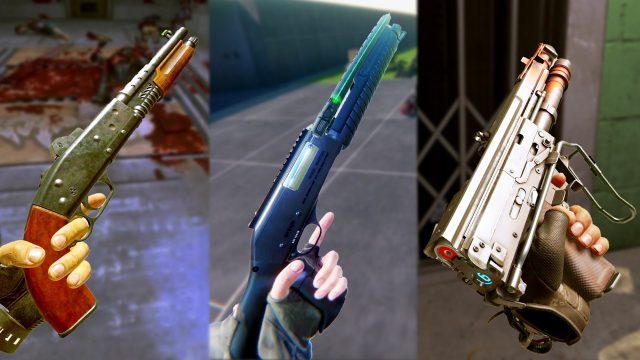
Our series Inside XR Design highlights examples of great XR design. Today we’re looking at shotguns in several different VR games to learn what makes them feel great in the player’s hand. In doing so, we’ll uncover the secret to making anything feel great in VR.
Editor’s Note: Two of the games feature in this episode of Inside XR Design, Boneworks and Arizona Sunshine 2, were released this month way back in 2019 and 2023 respectively. Despite being years old, both games remain great examples of using the power of feedback to make VR weapons feel great. To commemorate these dual anniversaries, we’re bumping this episode back up to the front page to highlight what they can teach us about VR interaction design.
You can find the complete video below, or continue reading for an adapted text version.
Ok, we’re jumping right into this… if I asked you ‘what’s your favorite shotgun in VR?’ you can probably picture it in your head pretty quickly. But could you tell me exactly what makes that shotgun feel so great?
Well, that’s kind of a trick question, because the answer is like 50 different little details that all add up to how a shotgun ultimately feels in the player’s hands.
So today we’re going to look at some of my favorite shotguns in VR and dissect all those little details to talk about how they contribute to that feeling. And by the end of this… I’m going to make the case that if we can understand what makes a shotgun feel great in VR, we can figure out how to make anything feel great in VR.
Arizona Sunshine 2 – Sunshine Shorty
Let’s kick things off with one of my favorite shotguns in all of VR. That would be the sawed-off pump-action shotgun in Arizona Sunshine 2—lets call it the Sunshine Shorty.
Just look at this thing go. It’s incredibly satisfying to use. Butwhy?
Well first of all, it’s pump action. You just can’t beat a pump-action shotgun in VR. Two-handed interactions in VR are always interesting, and making the player perform such a visceral and well-recognized gesture is always gonna make them feel like a bad-ass. Pumping a shotgun to load the next round is a clear extension of the ‘Instructed Motion’ concept I introduced in the previous episode, and an example of how such movements can infuse players with emotion.
The way the Sunshine Shorty reloads has a great little detail too. In many VR games you can reload a weapon just by touching the magazine or shell to the right place on a gun, but in Arizona Sunshine, you need to actually slide the shell into the weapon. The developers made this feel great by adding a custom hand-pose to show the player pushing the shell into the gun.
This little detail adds a lot to the feel of the weapon, because it changes reloading from just touching one thing to another into performing a gesture that captures more of the fantasy of sliding rounds into a shotgun. And importantly, it’s still feels good without being tedious. You might say the interaction is generous to the player… you don’t need to get the motion or position perfectly right in order for it to work.
But the motions themselves are only part of what makes using the shotgun satisfying. Providing feedback to the player intention is critical as well, and the easiest way to do this is with great sound and haptics.
And getting the sounds right is everything.
Let’s listen to how much less satisfying it is to use the Sunshine Shorty with weak sounds vs. strong ones:
For a shotgun, getting the pump-action sound just right is crucial. As someone who’s fired real shotguns, I wouldn’t say the Sunshine Shorty’s pumping sound is particularly realistic, but remember, the goal is to convey the feeling of pumping a shotgun, not simply playing back a perfect replication of a sound. In the case of this shotgun, its got just the right amount of crunch, clack, and metallic sounds to give a very satisfying feeling every time you pump it.
And though I can’t show you haptics on video, haptics can be almost as beneficial as audio itself, because it ties specific weapon sound effects to different locations on the weapon. For instance, when you pump the gun you should feel a haptic rumble in the pump hand, but not the trigger hand.
And again, both sounds and haptics are about giving the player feedback when they do something. When a player pumps the gun you’re conveying that they did something right by giving them the feedback of a sound effect and a haptic rumble.
Another piece of feedback is seeing the shotgun shell ejected from the gun after pumping it. This further reiterates the player has interacted with the shotgun in a valid way.
And there’s a great little detail the developers added here. On most real-life shotguns, the shell ejection port is on the side of the weapon so the shell is ejected away from the wielder. But the Sunshine Shorty has an ejection port on the top of the shotgun, just to make the feedback of ejecting the shell even more visible for players. I love it.
There’s one huge thing we haven’t talked about yet about what makes this shotgun feel great in VR. That would be the things the player actually shoots the gun at. You could do literally everything perfectly about the gun itself—the sounds, effects, tuning etc—but if the player pulls the trigger and the enemy just slowly lays down, that’s absolutely not gonna feel good.
Arizona Sunshine 2 might even go a bit over the top with the visual impact and sound effects when shooting zombies, but damn it feels great. The key is that the effect on the target correctly matches the sound and recoil of the weapon. Since the shotgun sounds powerful when it shoots, to deliver the feedback of that expectation, the target you’re shooting at needs to be satisfyingly impacted.
So the Sunshine Shorty feels great for all the reasons we talked about. But we can also learn a lot by noticing where things could be better. If I could just snap my fingers and make it so, these are the improvements I’d wanna to see with this gun:
First: Having an animated transition in hand poses between holding the shell and sliding it into the gun would make reloading look smoother visually.
Second: While the gun operates realistically in terms of pumping and loading, visually if we look into the chamber we can see the next shell from the gun isn’t actually loaded into the barrel. It just sits there until the chamber closes and then essentially appears in the barrel to be ejected after the shot.
And Third: Unless you’re counting while reloading, there’s no clear way to know when the shotgun is completely full of shells. That often means you’ll go to put another shell in the gun but end up throwing it on the ground instead because it can’t fit. This happened to me all the time when playing the game. Giving players an audio cue to indicate when the gun is almost full and then completely full is a subtle way to avoid this—and you’ll see exactly that with the next shotgun we talk about.